[Feature Request] Integer/Nearest-Neighbor Resolution Scaling Options #3588

Replies: 1 comment

-
|
I dunno if this was intended to have been solved by #3130, but using the latest version of SoH, I still don't see any way of achieving what I believe the OP was seeking. Currently, when rendering a widescreen native N64 resolution and scaling to an integer scale factor of 3x, you get something like this. I believe OP and I would both like something like this instead. Of further benefit would be the ability to scale the game and UI using separate algorithms: perhaps the game using the current bilinear form, while the UI could be set to instead utilize a nearest neighbor/sharp bilinear algorithm (this is what OP meant by 240 -> 960 integer scale -> 1080p bilinear). Is this still being worked on, or was the issue considered resolved? Thanks for the great project. |
Beta Was this translation helpful? Give feedback.


Uh oh!
There was an error while loading. Please reload this page.
Uh oh!
There was an error while loading. Please reload this page.
-
The 240p N64 mode is a great idea for SoH, but at present it seems to use a generic bilinear or bicubic upscale to the monitor's native resolution. The image is low resolution, but also very blurry.
An integer or nearest-neighbor upscale option would allow sharper image quality which, while not as strong as a CRT, is generally much cleaner to look at than a bilinear or bicubic upscale
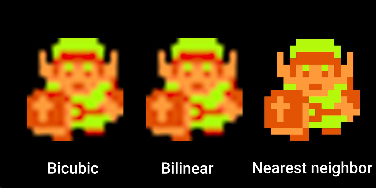
example with pixel art (compressed, but you get the point):
Then follow the next link for a tweeted image that shows the difference in image quality between blurred backgrounds vs integer upscaled ones in Ocarina of Time: https://twitter.com/CRTpixels/status/1460690720101216263 (note: the blurred background is with a 720p foreground).
A nearest neighbor scaling option for the 240p mode would be a great start. But, in a perfect world, an option to integer/nearest-neighbor upscale from any resolution would be incredible. This would require a little extra effort, as you would need to nearest neighbor upscale from the chosen resolution to the integer iteration of it closest to the monitor's native resolution and then bilinear or bicubic filter the rest of the way (nearest neighbor looks very bad when it's not a proper integer scale).
An example of handling non-integer resolutions would be 240p on a 1080p screen. It would looks like this:
240p -> 480p -> 720p -> 960p, then bilinear or bicubic to 1080p. Sharpness is preserved without the artefacting that comes from a non-integer nearest-neighbor upscale.
The assets of Ocarina of Time were made with low resolutions in mind and, in my opinion, look better that way than when scaled to native 1080p, 1440p, etc. -- but not with blurry filtering. Nearest neighbor scaling options would eliminate this issue and allow for a smooth, clean low resolution experience
Beta Was this translation helpful? Give feedback.
All reactions