This repository contains sources of Wroclive iOS app.
(Psst… server code is also open-sourced!)
Moving around Wrocław has suddenly become much easier!
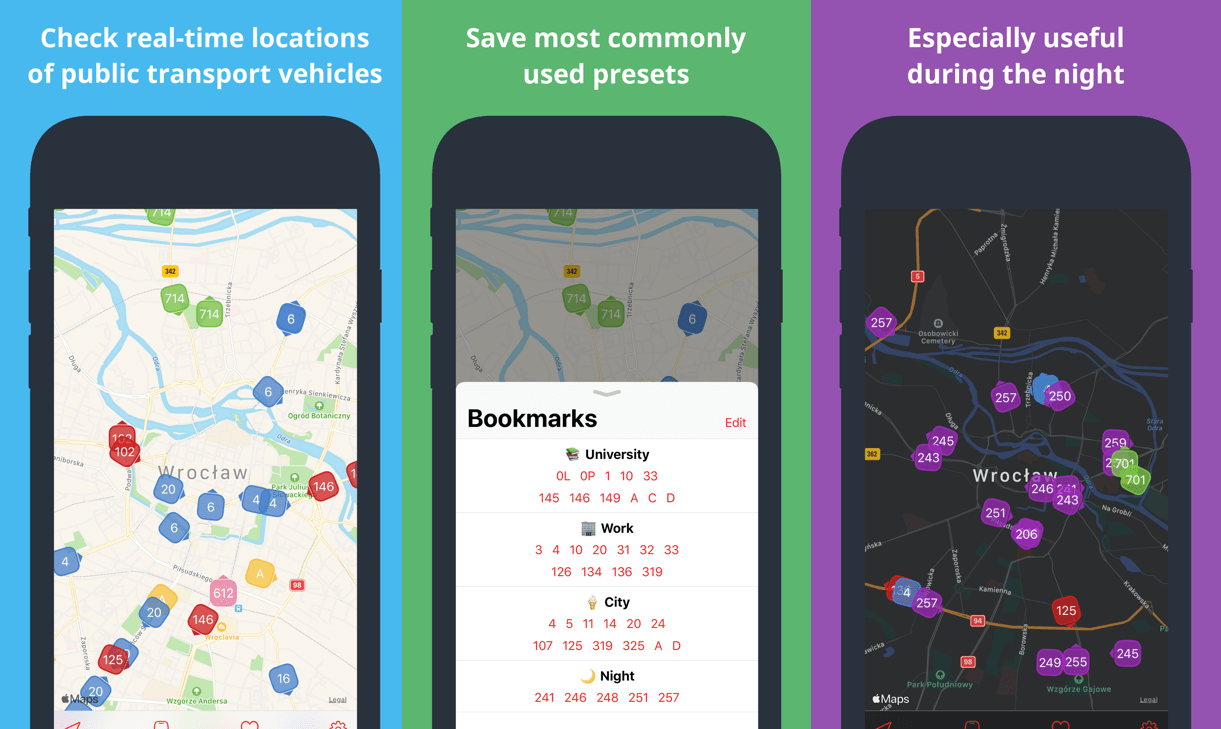
Wroclive allows you to check the current location of public transport vehicles. This will help you decide whether it is worth rushing to a stop or to calmly finish your coffee.
If you are only interested in specific lines, you can use our filtering functionality. You can also save the most frequently used connections for easier access.
It will also send you push notifications with all of the sudden and unforeseen changes, like when the tree is blocking tram tracks and the replacement-bus was dispatched.
With Wroclive you will never miss your bus!
-
Design - graphic assets
-
Icon - as
.svgandpng. -
Design - all of the button/toolbar images. Use
.svgfiles to edit and then export to pdf (Boxy SVG is an amazing tool for this). -
AppStore images - AppStore screenshots (before and after framing). Requires fastlane.
-
-
Wroclive - iOS app. This dir contains only
AppDelegate.swiftand application icon, everything else is inWrocliveFramework. -
WrocliveFramework - most of the Wroclive code. We use separate framework, so that our unit tests execute much faster (because now there is no need to launch the whole app).
-
Api - code to interact with wroclive.app api. DO NOT create new instances, use the one from
Environment. -
Assets - translations and images from
Design/Images. DO NOT use directly! We use SwiftGen to generate static types (seeGenerateddirectory). -
Coordinators - app navigation extracted from view controllers. There are a lot of good tutorials about this on the internet.
-
Environment -
Environmentcontains wrappers for Apple frameworks, so we can mock them during unit tests (so basically a dependency injection). Most of the time we injectEnvironmentininit(we do not use globalAppEnvironmentlike kickstarter/ios-oss). -
Generated - code generated by SwiftGen from our
Assets. Usemake gento regenerate. -
Helpers - code that did not fit anywhere else.
-
Card panel - card is a container view controller that pops from the bottom of the screen. Most of our views (for example: lines, bookmarks and settings) are presented in cards.
-
MapUpdateScheduler.swift - every 5 seconds it will dispatch
ApiMiddlewareActions.requestVehicleLocationsto update vehicle loctions on the map. -
DispatchStoreUpdatesFromAppleFrameworks.swift - will observe Apple frameworks and dispatch actions to update
AppState. For example: after user granted location authorization it will dispatchUserLocationAuthorizationAction.set(authorization)action.
-
-
Models - main data structures (for example:
Line,Vehicle,Bookmark). -
Redux - code connected to ReSwift. It contains
AppStatestruct that describes the state of the whole application. You should also checkActionsandMiddleware. -
Theme - color scheme, fonts and text attributes.
-
View controllers - basically our views. We use
ViewModelsfor testability. We also prefer SnapKit over storyboards.-
Main - main view, basically
MapViewController+ toolbar. -
Map - view controller responsible for map (duh…), nested in
MainViewController. -
Bookmarks card - view controller to manage bookmarks (heart icon on main toolbar)
-
Search card - view controller to select lines and create bookmarks (yes, the name is bad, but it is too much work to change it now).
-
Settings card - app settings
-
-
-
WrocliveTests - unit/snapshot tests
- __Snapshots__ - snapshots made by pointfreeco/swift-snapshot-testing.
If you are new to the app, then following reading order is recommended:
- Wroclive/AppDelegate.swift - although, you do not need to understand everything
- WrocliveFramework/Models
- WrocliveFramework/Environment
- WrocliveFramework/Redux
- View controller of your choice (BookmarksCard is the simplest one)
Before contributing to Wroclive you may want too read about following tools:
- ReSwift - we use it to manage
AppState, whatever you do in code you will probably have to interact with it! - mxcl/PromiseKit - async tool of our choice, used mostly for network request (but not only).
- pointfreeco/swift-snapshot-testing - we use it in our unit tests. Check out our Snapshots directory!
- Make - the most important command is
make gento generate SwiftGen files in (WrocliveFramework/Generated) - SwiftGen
- SwiftLint
Special thanks to the maintainers of the following libraries:
- ReSwift - Unidirectional Data Flow in Swift - Inspired by Redux
- SnapKit - A Swift Autolayout DSL for iOS & OS X
- mxcl/PromiseKit - Promises for Swift & ObjC
- Alamofire - Elegant HTTP Networking in Swift
- ivanvorobei/SPAlert - Native alert from Apple Music & Feedback. Contains Done, Heart & Message and other presets
- pointfreeco/swift-snapshot-testing - Delightful Swift snapshot testing
- fastlane - App automation done right
- SwiftGen - The Swift code generator for your assets, storyboards, Localizable.strings, … — Get rid of all String-based APIs!
- realm/SwiftLint - A tool to enforce Swift style and conventions
Wroclive is licensed under the Mozilla Public License 2.0 license. See LICENSE for more information.