A finance deep research agent designed to collect comprehensive information about publicly-traded companies and generate detailed investment research reports.


mcp-agent-dir.mp4
This application leverages AI to perform automated financial research and analysis. It gathers data from multiple reliable financial sources to create structured investment reports with:
- Basic stock information and metrics
- Business overviews and revenue analysis
- Recent news and market events
- Financial performance summaries
- Risk and opportunity assessments
- Investor sentiment analysis
The application is built using mcp-agent, a framework for creating AI agents with Model Context Protocol (MCP) integration. The application utilizes the deep research architecture to allow for the LLM to thoroughly research and revise it's findings until a comprehensive research report is complete.
See also the project website.
- Python 3.10 or higher
- uv package manager
- Clone the repository:
git clone <repository-url>
cd deep-research-agent-for-finance- Install dependencies:
uv add mcp-agentIn the example, the app uses gpt4o from OpenAI. If you'd like to use a model from another provider, you can edit the mcp_agent.secrets.yaml to add the API key for one of those services, add the model you'd like to use in mcp_agent.config.yaml, and add the provider wrapper i.e. AnthropicAugmentedLLM.
Examples for specifying other providers:
Run the finance research agent:
cd src/finance_deep_search
uv run main.py
The application will:
- Connect to the configured MCP servers
- Execute the research agent with predefined instructions
- Generate a comprehensive stock report
You can also use make to run the app. The following commands are equivalent, because all is the first target and its sole dependency is run-app:
make
make all
make run-app
Try make help for additional details. (It also has targets that are used to develop the project website.)
The application uses the following configuration files:
mcp_agent.config.yaml- Main configuration settingsmcp_agent.secrets.yaml- API keys and secrets (not tracked in git)
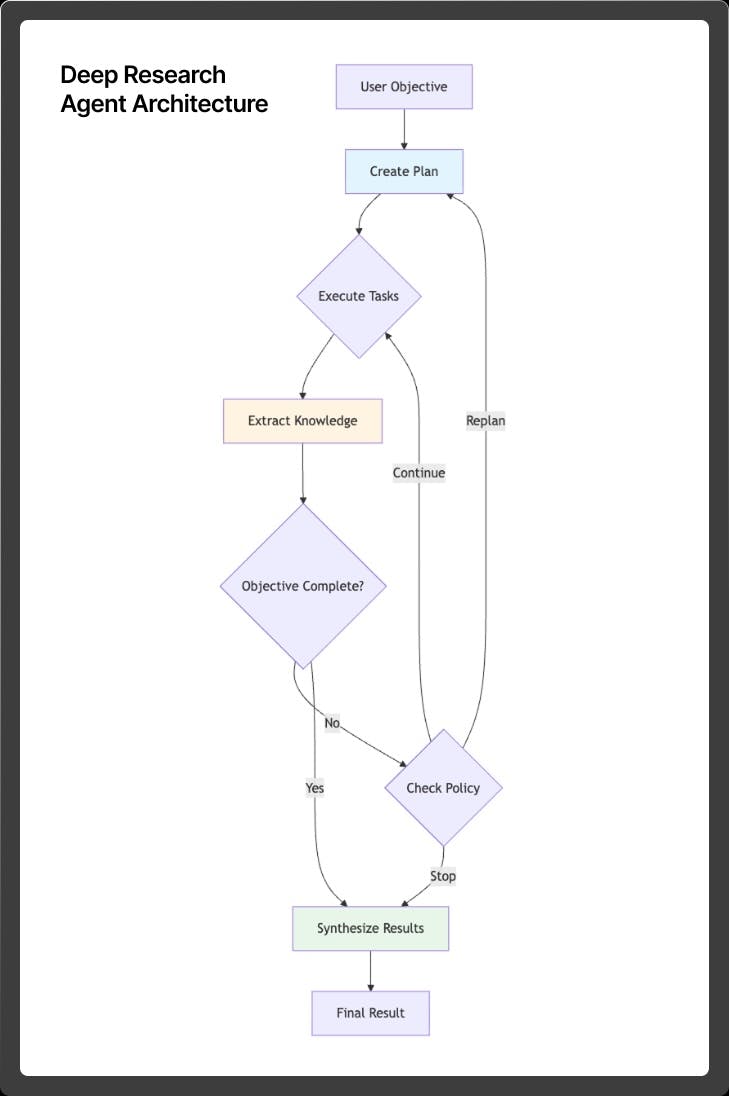
Source Code for the Deep Orchestrator
High level flow:
- Input Processing - Input user objective
- Plan Development - Develop a full plan, with steps and subtasks
- Execution Phase - Run through all steps
- New Verification Step - Add an objective verification.
- If objective verification is not satisfied, replan and repeat
Key components:
- TODO Queue - a queue of multiple steps and full plan for execution
- Memory and Knowledge - persisting memory and knowledge across steps. Determining when context should be fed in
- Non-LLM functions - Dependendency validation, MCP server validation, Agent verification
- Replanning - logic for triggering a new replan
- Emergency stop - stopping execution due to repeated failures
- Force completion - respecting the budget and forcing completion due to budget overrun
This project is part of the AI Alliance. We welcome contributions from developers with finance industry expertise, AI expertise, or those looking to grow their skills in either area.
For contribution guidelines, see the AI Alliance CONTRIBUTING instructions. Note that we use the "Developer Certificate of Origin" (DCO). In short, all this really requires is that you add the -s flag to your git commit commands. See this section for details.
- Code: Apache 2.0
- Documentation: Creative Commons Attribution 4.0 International
- Data: Community Data License Agreement - Permissive - Version 2.0
The project's companion website is published using GitHub Pages, where the pages are written in Markdown and served using Jekyll.
The docs folder contains the website sources. There are Makefile targets running the website locally. Try make help for details.
The repo root directory has several files and subdirectories that are part of the website implementation, include the following:
docs: The sources (Markdown, JavScript, CSS, etc.) for the web site.GITHUB_PAGES.md: Details about the website, how to edit it, and how to run it locally for previewing.check-external-links.sh: Our convention is that links to external URLs should have atargetdefined (e.g.,target="_blank") to open a new browser tab or window. This script checks for missing targets.Gemfile: Ruby library dependencies for the Jekyll website.