 Reflex
How do I wrap Jbrowse as a custom component ? #4998


-
|
The example codes are: import '@fontsource/roboto'
import {
createViewState,
JBrowseLinearGenomeView,
} from '@jbrowse/react-linear-genome-view'
const assembly = {
name: 'GRCh38',
sequence: {
type: 'ReferenceSequenceTrack',
trackId: 'GRCh38-ReferenceSequenceTrack',
adapter: {
type: 'BgzipFastaAdapter',
fastaLocation: {
uri: 'https://s3.amazonaws.com/jbrowse.org/genomes/GRCh38/fasta/GRCh38.fa.gz',
locationType: 'UriLocation',
},
faiLocation: {
uri: 'https://s3.amazonaws.com/jbrowse.org/genomes/GRCh38/fasta/GRCh38.fa.gz.fai',
locationType: 'UriLocation',
},
gziLocation: {
uri: 'https://s3.amazonaws.com/jbrowse.org/genomes/GRCh38/fasta/GRCh38.fa.gz.gzi',
locationType: 'UriLocation',
},
},
},
aliases: ['hg38'],
refNameAliases: {
adapter: {
type: 'RefNameAliasAdapter',
location: {
uri: 'https://s3.amazonaws.com/jbrowse.org/genomes/GRCh38/hg38_aliases.txt',
locationType: 'UriLocation',
},
},
},
}
const tracks = [
{
type: 'FeatureTrack',
trackId: 'ncbi_refseq_109_hg38',
name: 'NCBI RefSeq (GFF3Tabix)',
assemblyNames: ['GRCh38'],
category: ['Annotation'],
adapter: {
type: 'Gff3TabixAdapter',
gffGzLocation: {
uri: 'https://s3.amazonaws.com/jbrowse.org/genomes/GRCh38/ncbi_refseq/GCA_000001405.15_GRCh38_full_analysis_set.refseq_annotation.sorted.gff.gz',
locationType: 'UriLocation',
},
index: {
location: {
uri: 'https://s3.amazonaws.com/jbrowse.org/genomes/GRCh38/ncbi_refseq/GCA_000001405.15_GRCh38_full_analysis_set.refseq_annotation.sorted.gff.gz.tbi',
locationType: 'UriLocation',
},
},
},
},
]
const defaultSession = {
name: 'My session',
view: {
id: 'linearGenomeView',
type: 'LinearGenomeView',
tracks: [
{
type: 'ReferenceSequenceTrack',
configuration: 'GRCh38-ReferenceSequenceTrack',
displays: [
{
type: 'LinearReferenceSequenceDisplay',
configuration:
'GRCh38-ReferenceSequenceTrack-LinearReferenceSequenceDisplay',
},
],
},
{
type: 'FeatureTrack',
configuration: 'ncbi_refseq_109_hg38',
displays: [
{
type: 'LinearBasicDisplay',
configuration: 'ncbi_refseq_109_hg38-LinearBasicDisplay',
},
],
},
],
},
}
function View() {
const state = createViewState({
assembly,
tracks,
location: '10:29,838,737..29,838,819',
defaultSession,
})
return <JBrowseLinearGenomeView viewState={state} />
}
export default ViewI don't know how I should create viewState because I need to use a function called 'createViewState' to wrap some variables to make them as a state variable in the react app. and I also have to define a type for the result of 'createViewState' so the component can receive it as props, but it's quite difficult. Does anyone have good ideas to achieve it? |
Beta Was this translation helpful? Give feedback.
Replies: 2 comments 20 replies

-
|
can you do function View() {
return <JBrowseLinearGenomeView viewState={createViewState({
assembly,
tracks,
location: '10:29,838,737..29,838,819',
defaultSession,
})} />
}in which case if you have |
Beta Was this translation helpful? Give feedback.

-
|
but another file https://s3.amazonaws.com/jbrowse.org/genomes/GRCh38/ncbi_refseq/GCA_000001405.15_GRCh38_full_analysis_set.refseq_annotation.sorted.gff.gz is only 50 Mb. It also could not be loaded. |
Beta Was this translation helpful? Give feedback.

-
|
Can you share the code you have so far so I can try it out? |
Beta Was this translation helpful? Give feedback.
-
|
Yes, This is my codes: import reflex as rx
from typing import Any
class JBrowseLinearGenomeView(rx.NoSSRComponent):
library: str = "@jbrowse/react-linear-genome-view2"
tag: str = "JBrowseLinearGenomeView"
view_state: rx.Var[Any]
def j_browse_linear_genome_view(view_state: dict | rx.Var[dict]):
return JBrowseLinearGenomeView.create(
view_state=rx.Var("createViewState",_var_data=rx.vars.VarData(imports={"@jbrowse/react-linear-genome-view2": "createViewState"}),).to(rx.vars.FunctionVar).call(view_state)
)
view_stat = {
"assembly": {
"name": "hg38",
"sequence": {
"type": "ReferenceSequenceTrack",
"trackId": "GRCh38-ReferenceSequenceTrack",
"adapter": {
"type": "BgzipFastaAdapter",
"uri": "https://jbrowse.org/genomes/GRCh38/fasta/hg38.prefix.fa.gz",
},
},
"refNameAliases": {
"adapter": {
"type": "RefNameAliasAdapter",
"uri": "https://s3.amazonaws.com/jbrowse.org/genomes/GRCh38/hg38_aliases.txt",
},
},
},
"tracks": [
{
"type": "FeatureTrack",
"trackId": "genes",
"name": "NCBI RefSeq Genes",
"assemblyNames": ["hg38"],
"category": ["Genes"],
"adapter": {
"type": "Gff3TabixAdapter",
"uri": "https://s3.amazonaws.com/jbrowse.org/genomes/GRCh38/ncbi_refseq/GCA_000001405.15_GRCh38_full_analysis_set.refseq_annotation.sorted.gff.gz",
},
"textSearching": {
"textSearchAdapter": {
"type": "TrixTextSearchAdapter",
"textSearchAdapterId": "gff3tabix_genes-index",
"uri": "https://s3.amazonaws.com/jbrowse.org/genomes/GRCh38/ncbi_refseq/GCA_000001405.15_GRCh38_full_analysis_set.refseq_annotation.sorted.gff.gz.ix",
"assemblyNames": ["GRCh38"],
},
},
}
]
}
class BrowseState(rx.State):
pass
@rx.page(route="/")
def test_jbrowse() -> rx.Component:
return rx.flex(
rx.heading("Test JBrowse"),
j_browse_linear_genome_view(view_stat),
direction="column",
width="100%",
justify="center",
class_name="p-5",
) |
Beta Was this translation helpful? Give feedback.
-
|
that worked for me, i'm assuming bun is having an issue with some zip files, in any case, this should be fixed by simply installing NPM in your host sytem |
Beta Was this translation helpful? Give feedback.
-
|
It's quite strange; I have upgraded my npm (11.2.0) and bun (1.2.5) to the latest version. But I still can't get the track data. Did you see the page like this: When I hit the But I suppose to get it shown in this link: https://jbrowse.org/demos/lgv-nextjs/. |

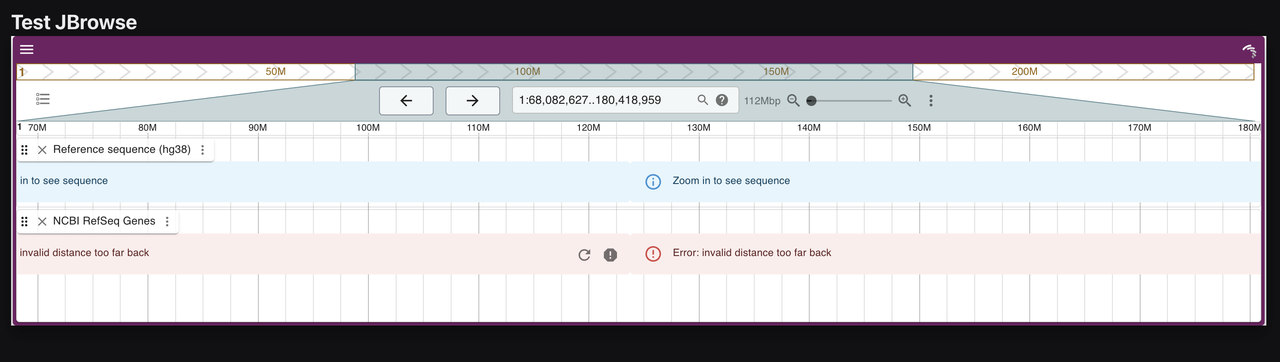
Beta Was this translation helpful? Give feedback.
-
|
@adhami3310 I've tried deploying the jbrowse2 demo using Next.js, and I've found that the app deployed with Next.js can correctly read the compressed files. However, when deployed with Reflex, it fails to read the compressed files, but it can correctly read the uncompressed files. We are using the same NPM and NodeJS versions, which is very strange. Could it be that Reflex's call to the Next.js configuration is preventing the reading of compressed files? |
Beta Was this translation helpful? Give feedback.
-
|
can you try setting |
Beta Was this translation helpful? Give feedback.
-
It doesn't work; probably the function of |
Beta Was this translation helpful? Give feedback.
-
i would be surprised in any case, you can go to the |
Beta Was this translation helpful? Give feedback.
-
Yes, finally, with the help of the JBrowse author, the issue is because the version of Next.js in Reflex is a bit behind the latest version, so I simply changed the Next.js version in - "next": "15.0.4",
+ "next": "15.2.3",and the go into npm install
npm run devand in main folder, run REFLEX_BACKEND_ONLY=1 REFLEX_USE_NPM=1 reflex runFinally, JBrowse can fetch any compressed data files. So how can I easily change the Nextjs version in reflex app ? |
Beta Was this translation helpful? Give feedback.
-
|
nextjs is stuck on that version because of other bugs in recent versions, but this adds one to the pile, we will look into it @masenf |
Beta Was this translation helpful? Give feedback.
-
Thank you so much for all help and supports |
Beta Was this translation helpful? Give feedback.


Yes, finally, with the help of the JBrowse author, the issue is because the version of Next.js in Reflex is a bit behind the latest version, so I simply changed the Next.js version in
.web/packages.json.and the go into
.webfolder, runand in main folder, run
Finally, JBrowse can fetch any compressed data files. So how can I easily change the Nextjs ve…