Releases: spicetify/cli
v0.9.8

Add
- Inject extension with file extension
.mjsas a script withtype="module". - Symlink
node_modulesfolder found in user's Extensions folder tozlink.
With these 2 new features, you can take advantage of Node Package Manager to download and use utilities packages. For more information, please take a look at Wiki page and my example.
Change
- Preprocess
disable_sentry: Now also disable Amazon Qualaroo. Please runspicetify restore backup applyfor new preprocess routine to be applied. - Extension
keyboardShortcut.js: support play a track in playlist app.
Remove
new_feedback_uiandsearch_in_sidebaradditional options: No longer customizable.
Fix
v0.9.7
v0.9.6
Add
minimal_uiadditional option: Alternative lightweight UI from Spotify. It's basically Web Player UI with some small differences.
To access it, run:
spicetify config minimal_ui 1
spicetify apply
and open via new button in bottom right.
Note: Not yet available for Spotify in Linux.
tastebudsadditional option: Testing feature in Minimal UI. Not yet usable for anyone. But when it is, you're the first to test. More info.
To access it, run:
spicetify config tastebuds 1
spicetify apply
then open Minimal UI, it locates at left sidebar.
- Slight update on
SpicetifyDefaulttheme for Minimal UI.
Fix
Spicetify.showNotificationAPI method: #99
v0.9.5
Add
-
autocommand: Automatically check Spotify state, backup and apply if needed, then run Spotify normally. Useful for being a shortcut to launch Spotify and ensure that Spotify always be spiced. -
French translation for
redditapp
Fix
redditandbookmarkapps: glue.css missing bug
Notes for Windows user: If you are having trouble with install.ps1 script because it requires Internet Explorer or Powershell 5, please use install_curl.ps1
curl.exe "https://raw.githubusercontent.com/khanhas/spicetify-cli/master/install_curl.ps1" -o install_curl.ps1
Invoke-Expression install_curl.ps1v0.9.4
Fix:
- Custom apps is injected normally now. #64
- glue.css: Prior to this update, I had modification in preprocess that removed almost all glue.css files and referenced their links to zlink' app's
glue.csslink. This modification purpose was to prevent Spotify loading same CSS file over and over again. Since it was adopted by Spotify in client version 1.1.15, we don't to do this trick anymore. #67 colorcommand: should display all default colors whencurrent_themeconfig is blank.
v0.9.3
Add
- API
ContextMenu: Create custom item and prepend to user right click menu. Check out its docs in global.d.ts. - Extension Shuffle+: Support Artist context
- Extension Shuffle+: Ability to play artist, album, playlist, folder and selection of tracks with Shuffle+ straight in right click menu:


Change
- Extension Trashbin: No longer use icon to toggle trash state, both in player bar and artist page. Instead, user can just right click at track and artist link to Throw to or Take out of Trashbin.


- Theme SpicetifyDefault: Remove Starwar Easter egg and New Playlist button (#55) and some small update.
- Theme SpicetifyDefault: Move dark colorscheme to its own section. Now user can just run these commands to switch to default Dark theme:
spicetify config color_scheme Dark
spicetify apply
Fix
- Command line flag
--quiet. Was--quite. #54 Thanks @StewartThomson - API description for
Spicetify.Player.nextandSpicetify.Player.previous. #46 Thanks @Strazdonis
v0.9.2
v0.9.1
Add
-
Ability to shut off AdditionalFeatures: Most of options in
AdditionalFeaturessection are features that are being tested by Spotify developers. They are automatically enabled in some groups of users, disabled on others. If you don't like one of these features at all, set it to-1. #28 -
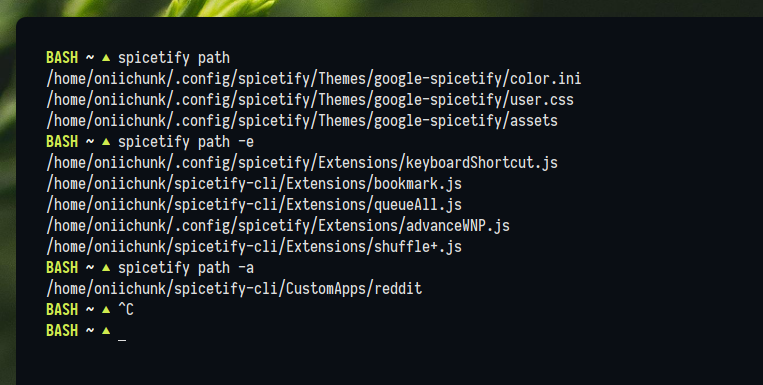
Ability to print all colors, all paths, all config values or one of config value right in CLI. Check out
spicetify -hfor usage.

Change
- Extension
keyboardShortcut.js: Majority of keybinds are changed to comply with other keyboard-driven softwares. I also wrote a bit of documentation in extension file, check them out for current key combinations and add/change on your own.
Fix
LibURI->URIinspicetifyWrapper.Spicetify.getAudioDataandSpicetify.getAblumArtColorscan be used normally now.
Remove
made_for_you_hubconfig option: This feature is now official and no longer customizable.
v0.9.0
Add
color_schemeconfig option: Change color schemes at ease with this new option. Simply put your schemes in same color.ini file in same theme, but in different sections. Examplecolor.ini:
[Base]
main_fg        = 1a73e8
secondary_fg   = 5f5e68
main_bg        = ffffff
...

[Dark]
main_fg        = 8AB4F8
secondary_fg   = BDC1C6
main_bg        = 202124
...

[Green]
main_fg        = C2D935
secondary_fg   = DEDEDE
main_bg        = 0A0E14
...
Now, if you want to change to [Dark] scheme, run:
spicetify config color_scheme Dark
spicetify update
On default, color_scheme option is blank. If color_scheme option is blank, first section in color.ini will be used.
new_feedback_uiconfig option: Enable new feedback UI with refreshing icons, text and buttons.
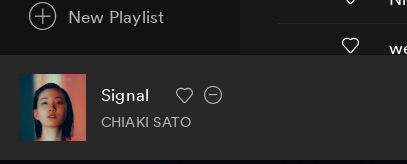

search_in_sidebarconfig option: Enable new search UI. Search button is also moved to sidebar.

Fix
- Extension djMode: Double clicking on a track in playlist or album now queues that track.
I just made a new theme for Spicetify for fun, it has a bit of Google style. Check it out if you like: https://github.com/khanhas/google-spicetify

v0.8.1
Add
- [LINUX] Ability to use XResources database in theme's
color.ini. #17
Extremely useful for who usespywalto generate color scheme.
Syntax:${xrdb:<variable name>}or${xrdb:<variable name>:<fallback value>}
Example usage:
[Base]
main_fg                               = ${xrdb:color14}
secondary_fg                          = ${xrdb:foreground:#FFF}
main_bg                               = ${xrdb:background}
...
- Ability to use environment variable in theme's
color.ini
Syntax:${<variable name}
Example usage:
main_fg = ${LIGHT_GREY}
Note: Environment variables, not shell variables.
- Short hex color code support:
#FFF,#544
Fix
- Extension Shuffle+: Buttons not appended bug