⚠️ Alpha Version: This extension is in active development. Bugs and breaking changes may occur. Contributions, feedback, and bug reports are highly welcome!
A VS Code extension that displays all TypeScript and ESLint diagnostics across your entire project in a convenient sidebar view.
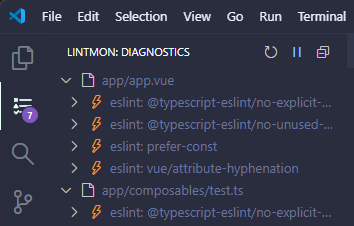
- Complete Project Overview: See all diagnostics from your entire project, not just open files
- Uses TypeScript Language Service API and ESLint CLI for full project scanning
- Unlike VS Code's built-in Problems panel, shows diagnostics from all files (even unopened ones)
- Smart Framework Detection: Automatically detects and configures for Vue, Nuxt, React, Next.js, Angular, NestJS, and more
- Framework-specific exclude patterns (e.g.,
.nuxt/,.next/,dist/) - Nuxt project references support
- Framework-specific exclude patterns (e.g.,
- Flexible Grouping: View diagnostics grouped by file, error type, or both
- Quick Navigation: Jump to any diagnostic with a single click
- Keyboard Shortcuts: Navigate diagnostics quickly with F8 (next) and Shift+F8 (previous)
- Badge Counter: Activity bar badge shows error count at a glance (even when view not visible)
- Pause/Resume: Temporarily pause scanning when needed (state persists across sessions)
- Quick Fixes: Apply ESLint auto-fixes directly from the sidebar (where available)
- Configurable Filters: Show/hide errors and warnings, filter by file type
- Smart Config Detection: Automatically finds and uses your project's tsconfig.json and ESLint configuration
- Supports both ESLint flat config and legacy formats
- Performance Optimized:
- Debounced refresh (500ms) to prevent rapid re-scans
- Pre-compiled regex patterns for exclude pattern matching
- Proper resource cleanup and disposal
- Smart pending refresh logic for queued scans
- Open the LintMon sidebar by clicking the icon in the Activity Bar
- All diagnostics from your project will be displayed automatically
- Click any diagnostic to jump to the file and line
- Use F8/Shift+F8 to navigate between diagnostics
- Use the pause button to temporarily stop scanning (useful when system is slow)
- Click the lightbulb icon for quick fixes (where available)
LintMon offers two scan modes (configurable in settings):
-
Full Project Scan (default): Scans all files in your project using TypeScript API and ESLint CLI
- Shows diagnostics from all files, not just open ones
- More comprehensive but slower
- Recommended for most projects
-
Open Files Only: Uses VS Code's built-in diagnostics
- Only shows diagnostics from currently open files
- Faster but limited scope
- Useful for very large projects or performance-constrained environments
See VS Code Settings (Preferences > Settings > Extensions > LintMon) for all available options.
- VS Code 1.85.0 or higher
- TypeScript and/or ESLint configured in your project
LintMon is in alpha and we welcome contributions! Feel free to:
- Report bugs and issues on GitHub
- Submit feature requests
- Contribute code via pull requests
- Share feedback and suggestions
MIT