*this repository was private for all of the development process but now it's public since i'm done with this project
This project shows how to take a "local" node-reactjs application and dockerize it. After docker images were made, I tested them locally with docker-compose. The next step was to create a jenkins pipeline that would compile the images and push them to ECR (Amazon Elastic Container Registry). When that was done, the final step was to create some kubernetes deployments and launch them with EKS (Elastic Kubernetes Service) and also deploy it in jenkins.

the source code was built by 'rbilag'. From beginning, I wanted to dockerize a project with a nice visual representation so I have chosen one of the great Clone-Wars collection.
I aimed for one with as few third-party dependencies as possible (actually just "moviedb"), and avoided the less documented ones since my understanding of nodejs and react is little.
Eventually i went with "Roseflix" project which involves: Typescript, reactjs, nodejs and mongodb (with help of "mongoose" library).
The original project is spreaded across two repositories. One for frontend, one for backend, and it also has an instruction to use a momgodb atlas, so I already assumed it will take 3 containers for the whole project without out-sourcing the db part.
mongodb container - Just grabbed one of the latest mongodb images, created admin credentials as env vars and used the defualt port of 27017. I also tested the project with a cloud db on "mongodb atlas". Just change the connection string and it will work. Because the cluster get frequently deleted, i didn't mind that my stateful mongodb isn't using a persistant volume. Anyhow, there is mongo atlas which is faster and more scalable for stateful data.
backend container - I went with node 15.13 alpine (project originally written for node14) to avoid compatability issued which i won't know how to solve.
Rest of the work was just moving the env vars from a "config.env" file to the Dockerfile, changed the "npm run" attribute from "dev" to "prod".
frontend container - Node version 15.13 for same reasons as before. I created two versions of the Dockerfile.
First version is simple and for development. I just moved the variables of ".env" file to the Dockerfile, and set a "PORT" var to use a port of my choice. The developer didn't include a "prod" script in the "package.json" this time.
Second version is a multi-step Dockerfile which first compiles the Javascript files using the default "build" command. Unfortunately env var references in the code are getting "sealed" at this stage and cannot be changed later. There are some ways to bypass it but it's not the project's purpuse.
Second step imports the compiled "build" folder from previous state, then sets the environment mode to production and install dependencies. Another hassle is the npm web server doesn't work for prod builds, thus requires use of an external web server. I went with "serve" which is light and sufficient for the task.
By using multi-step build i managed to reduce the image size (uncompressed) from 559MB to 400MB.
Really the simplest file there is, haven't moved any env file out because this was just for local testing. I just made sure they all have hostnames and are on the same network. Important to mention that eactjs runs from the browser, thus contact the backend container externally. I used "host.docker.internal" for local tests.
Jenkins runs on an ec2 instance. It has: Java, docker, aws-cli, kubectl. I even made a bash script which installs and verifies all of the components, although making an AMI of it will be better.
The first pipeline (source file "Jenkinsfile-BuildImage") is triggered by a push webhook from a private GitHub repository. It knows which images to build/update by a text file called "Images.txt". Each line on the file is both an image name to be created, and the name of the folder who contains the required files (under the root path, if the file is empty creation will be skipped). when an image is ready it will be pushed to AWS ECR. after it is done with the images, it triggers the kuberenetes update pipeline, clear the docker cache and clear the workspace.
(I also made a jenkinsfile which pushes the images to a private DockerHub repo, source file is "Jenkinsfile-Dockerhub").
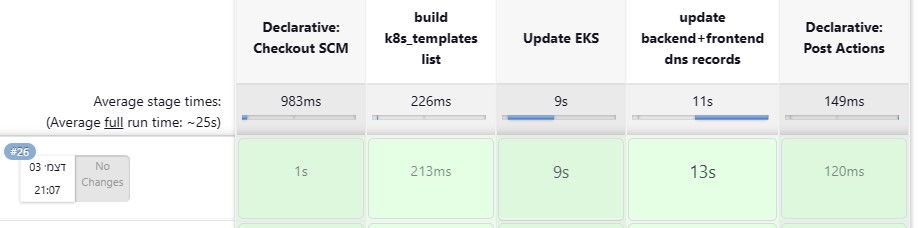
The second pipeline (source file "Jenkinsfile-update_k8s") first executes "kubectl apply -f" for any deployment which its name is on "k8s_templates.txt". The pipeline also indicated if it was automatically triggered by "BuildImage" pipeline or by itself. Then the pipeline launches a bash script which query kubectl for the load-balancers' url of the backend api (dp1001backend.meister.lol) and the frontend url (roseflix.meister.lol), and update the route53 dns records accordingly. at last the pipeline clears the workspace. The pipeline also deals with two problems i had due to the nature of the project, more on that in the "compensations" section.
update k8s pipeline
ECR (Amazon Elastic Container Registry) was chosen because i was already familiar with Dockerhub and wanted to try another artifacts platform. I used a private ECR, so env vars of the images are safe.

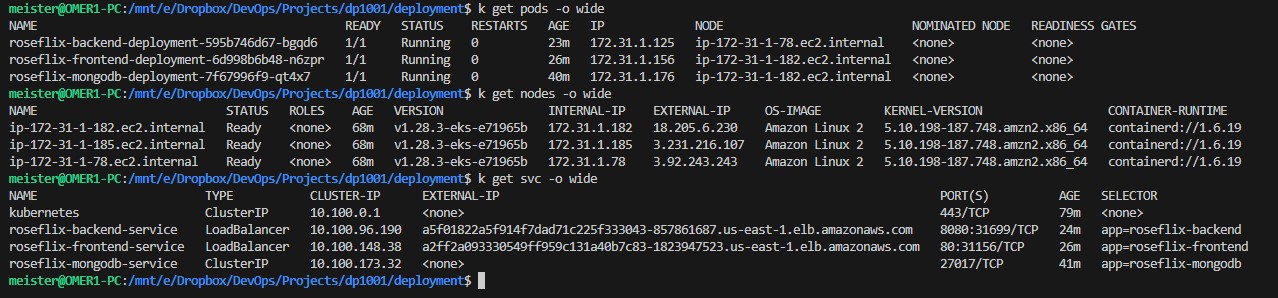
Setting up the cluster for the first time was relatively demanding since it required manual creation of IAM roles and VPC settings. Especially the process of granting cluster management to another IAM user in the account (edit the "aws-auth" config-map in vi editor from the cloudshell console). The next times went relatively fast. Furtunately for me, i was able to run the cluster with only 3 free-tier t2.micro instances in the node group.
Due to the nature of such project, and to consider I had some knowledge and time limitations, I had to build things a bit crooked. Here is the list of them:
- Deleting the cluster after every use - for private educational use like I did which avarages at 2 hours a day, there's no justification for paying 2.4$ a day (0.1$ for every eks hour) just to not go through cluster lunch, it's a bit of a shame that Amazon doesn't give it for free for small users like Microsoft and Google do.
- Not using a secret manager - Both aws secrets manager and hashicorp vault require some complex initial configuration to get working. Since I delete the cluster every time, it will be a burden to work with them. At the development stage i used Jenkins' credentials manager to inject the api key to the backend image as env var. Now it's unnecessary since it sored in a private ECR image.
- Not hiding the mongodb credentials in the dockerfile and in backend k8s template - could also be dynamicly injected using image build without storing them on the SCM.
- Make a helm chart for the kubernetes templates
- Work with a secret manager
- Integrate the mongodb container with a persistent volume (already have k8s template ready), install aws csi driver to provision an EBS volume
- Change CI system to "GitHub Actions", and use "github secrets" for secrets management.
- @rbilag - for the original project. all javascript code was made by her.

This project dockerizes a Node.js-React.js app, utilizing Jenkins pipeline management, Docker for image compilation and ECR for image storage. Kubernetes deployments are managed on EKS, and being deployed in Jenkins pipelines. The source code, , features Typescript, React.js, Node.js, and MongoDB. Containerization involves three containers: MongoDB, backend, and frontend.
Multi-step Dockerfiles reduce frontend image size from 559MB to 400MB. Jenkins runs on an EC2 instance, executing two pipelines: building/updating images and updating Kubernetes. Compensations include manual cluster deletion for cost savings and avoiding secret managers initialization.
Future improvements include Helm chart creation, secret manager integration, persistent volume for MongoDB conainer, and potential CI system transition to GitHub Actions. Credits to @rbilag for JavaScript code.