A touch-driven UI interaction library for Arduino & PlatformIO — part of the InputEvents family.
EventTouchScreenextends InputEvents to handle touchscreen input with all the familiarEventButtonevents, plusDRAGandDRAGGED.- Provides a UI abstraction layer:
- Spatial primitives:
Coords_s,TouchPoint_s,Region. - Widget scaffolding:
BaseWidget, containers, and mixins (TouchWidgetMixinVirtualPinWidgetMixin,ButtonLabelWidgetMixin, etc.). - Icons -
BaseIconaccepts parameters to specify colours, padding, disabled state etc (auto greyscaling)
- Spatial primitives:
- Includes the specialized widget
BaseTouchKeypadWidget(example pictured below). - Display-agnostic — widgets & icons define a
draw()contract, but rendering is left to your application (use Adafruit GFX, TFT_eSPI, LVGL, or any other graphics library). - For boards/frameworks that support the C
stdlibrary, a screen manager is provided:EventScreenManager,IManagedScreen,IScreenRouterScreenTransition.
This is a concrete implementation of the BaseTouchKeypadWidget. The ❌ and ✔️ each respond to both touch and the physical buttons below them.
Both screen & physical buttons provide visual feedback when pressed.
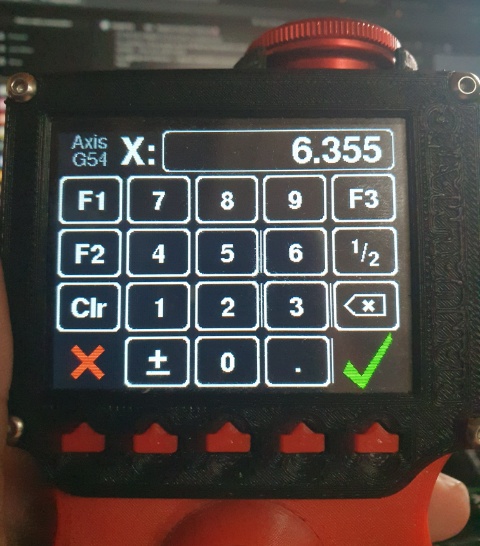
(This screen is part of the ManualmaticLib project. I will link to the source when I have published it - if you can't wait, chat with me on Discord...)
The library is organized into functional layers:
- EventTouchScreen & TouchPoint_s — core touch event logic and touch point representation.
- TouchScreenAdapter/ — hardware adapters for different touchscreen controllers.
- TouchKeypad/ — a base class for on-screen keypad widgets.
- ui/ — core widgets, mixins, containers, icons, and geometry for building interactive UI.
- ScreenManager/ — application-level orchestration of screens, routing, and transitions for boards/frameworks that support the C
stdlibrary.
| Feature | Benefit |
|---|---|
| Touch adapter abstraction | Swap drivers without changing UI code |
| GFX-agnostic widgets | Use your favourite rendering library (Adafruit GFX, TFT_eSPI, LVGL etc) |
| Event-driven interaction | Unified with InputEvents’ button model |
| Extensible widget system | Write custom widgets with minimal code |
| Optional screen manager | Structure apps with multiple screens |
Feedback, bug reports and pull requests are very welcome or chat on Discord if you have any questions.
Whilst this library is fully functional and broadly tested, it is still a work in progress, so there may be API changes.