A Flutter widget that turns a value into an animated deck of cards. It can be used for showing team scores, stock quotes, bonus points, etc.
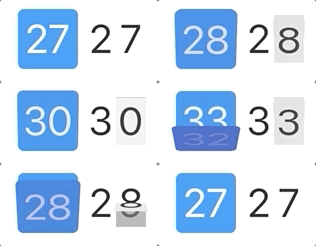
- Add a dependency on
rolodexpackage inpubspec.yaml:
dependencies:
rolodex: any- Import the library:
import 'package:rolodex/rolodex.dart';- Wrap a widget that shows a value with
Rolodex:
Rolodex(
  value: _counter,  // <-- Make sure to specify the value
  child: Text(      // <-- The wrapped widget
    '$_counter',
    style: Theme.of(context).textTheme.display1,
  ),
),
You can try this with the default Flutter app generated by flutter create.
Rolodex provides limited but extensive customization capabilities via themes. You can customize Rolodex by specifying theme attributes, for example:
Rolodex(
  theme: const RolodexThemeData(
    direction: RolodexDirection.reversed,
    cardColor: Colors.blue,
    shadowColor: Colors.indigo,
    clipBorderRadius: BorderRadius.all(Radius.circular(6)),
    alwaysShowBackground: true,
  ),
  value: _counter,
  child: SizedBox(
    width: 60,
    height: 60,
    child: Center(
      child: Text("$_counter",
        style: Theme.of(context).textTheme.display1.copyWith(
          fontSize: 40, color: Colors.white,
        ),
      ),
    ),
  ),
),Instead of customizing every Rolodex widget in your app, you might want to specify global theme settings
via RolodexTheme:
return MaterialApp(
  title: 'Flutter Demo',
  theme: ThemeData(
    primarySwatch: Colors.blue,
  ),
  home: RolodexTheme(
    data: const RolodexThemeData(  // <-- These settings will apply to all Rolodex widgets in the widget tree
      mode: RolodexMode.splitFlap,
      maxCards: 2,
      animationDuration: const Duration(milliseconds: 200),
    ),
    child: MyHomePage(title: 'Flutter Demo Home Page')
  ),
);