
A terminal user interface for browsing and searching your company's HiBob employee directory.
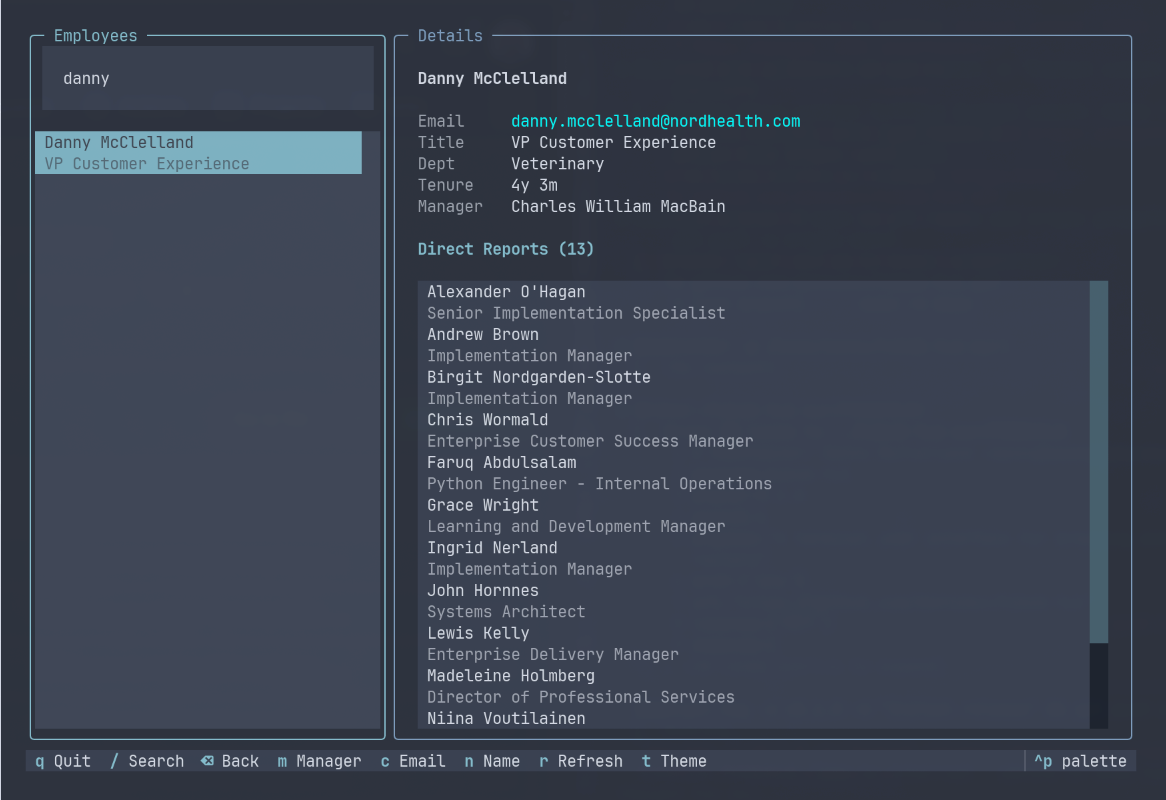
- Fast search - Real-time fuzzy search by name or email
- Employee details - View title, department, tenure, and manager
- Org navigation - Browse direct reports and navigate up the org chart
- Clipboard integration - Copy email or name with a single keypress
- Theme support - 20+ built-in themes with Omarchy auto-detection
- Caching - Fast startup with local caching of employee data
- CLI mode - Quick search from command line without launching the TUI
yay -S hibob-tuigit clone https://github.com/dannymcc/hibob-tui.git
cd hibob-tui
pip install .Create a credentials file at ~/.config/hibob/credentials:
HIBOB_SERVICE_USER_ID=your_service_user_id
HIBOB_SERVICE_USER_TOKEN=your_service_user_token- Log in to HiBob as an admin
- Go to Settings > Integrations > Service Users
- Create a new service user with read access to employee data
- Copy the Service User ID and Token to your credentials file
Important: Keep your credentials file secure:
chmod 600 ~/.config/hibob/credentialsLaunch the interactive interface:
hibob-tuiSearch directly from the command line:
hibob-tui john smithThis prints matching employees without launching the full TUI.
| Key | Action |
|---|---|
/ |
Focus search input |
Enter / Tab |
Select first result from search |
j / k |
Navigate up/down (vim-style) |
Tab |
Switch between employee list and direct reports |
m |
Go to selected employee's manager |
Backspace |
Go back to previous employee |
c |
Copy email to clipboard |
n |
Copy name to clipboard |
r |
Refresh data from API |
t |
Cycle through themes |
q |
Quit |
HiBob TUI supports all Textual built-in themes:
textual-dark(default)catppuccin-mochadraculagruvboxnordtokyo-nightmonokaisolarized-light- And many more...
Press t to cycle through available themes.
If you use Omarchy, HiBob TUI automatically detects and applies your system theme. It polls for theme changes every 2 seconds, so switching themes in Omarchy instantly updates the TUI.
Employee data is cached locally at ~/.cache/hibob/employees.json for fast startup. The cache includes:
- All employee records
- Named lists (titles, departments)
- Timestamp of last fetch
The status bar shows the cache age. Press r to force a refresh from the API.
- Python 3.10+
- HiBob service user with API access
wl-copy(Wayland) orxclip(X11) for clipboard support
# Clone the repo
git clone https://github.com/dannymcc/hibob-tui.git
cd hibob-tui

# Install with dev dependencies
pip install -e ".[dev]"

# Run linter
ruff check hibob_tui

# Run tests
pytestMIT License - see LICENSE for details.