Welcome to Iguama's Redemption Platform (from now on referred to as "The Platform") documentation. Our platform allows your customers to redeem their reward points in the digital merchant of their choice, in order to achieve that, there are some API requirements that need to be provided by any loyalty program interested in integrating to our platform.
The overall process is composed of three steps:
- Authentication
- Redemption
- Redemption Reversal
- Platform integration
The Plaform handles user authentication through OAuth2 authorization framework, so the authorization itself happens within the Loyalty program's website, The Platform interacts with loyalty program's technology to obtain the authorization grant needed to access the user's account. Further information about OAuth2 can be found here.
The complete authentication process is described below:
- The Platform will redirect it's users to the loyalty program's website to start the authentication flow, within this URL redirect, we will send the following parameters:
| Field | Type | Description |
|---|---|---|
| client_id | String | The Platform's clientID (assigned by the loyalty program's platform) |
| redirect_uri | URI | URI where the service redirect's the user-agent after an authorization code is granted |
| scope | Enum (READ, REDEEM) | Specifies the level of access that The Platform is requesting |
- The Platform will handle the callback request, this request should contain at least the following information:
| Field | Required | Description |
|---|---|---|
| authorization_code | Yes | Authorization code needed to obtain the access token |
- The Platform will request an access token from the Loyalty Program's API, by passing the authorization code along with authentication details, including the following information:
Below is an example of the API call to obtain the access token with grant_type=AUTHORIZATION_CODE
curl -X POST \
  https://api.loyaltyprogram.com/oauth/token \
  -H 'Content-Type: application/json' \
  -d '{
	"client_id": "$CLIENT_ID",
	"client_secret": "$CLIENT_SECRET",
	"grant_type": "AUTHORIZATION_CODE",
	"code": "$CODE"
}'| Field | Type | Description |
|---|---|---|
| client_id | String | The Platform's clientID (assigned by the loyalty program's platform) |
| client_secret | String | The Platform's clientSecret (assigned by the loyalty program's platform) |
| code | String | The authorization code received in the previous step |
| grant_type | Enum (AUTHORIZATION_CODE, CLIENT_CREDENTIALS) | Specifies the grant_type used to request authorization, in this case, AUTHORIZATION_CODE will be sent. |
Expected response
{
    "access_token": "095240ff-d12a-4fd6-bc58-b16bac8e7bfd",
    "refresh_token": "095240ff-d12a-4fd6-bc58-b16bac8e7bfd",
    "expires_in": "3600000"
}| Field | Type | Description |
|---|---|---|
| access_token | String | Token needed to interact with the Loyalty Program's API to request user's information. |
| refresh_token | String | Token that can be used to request a new access token, once the current one has expired. |
| expires_in | Integer | Time to Live of the issued token in miliseconds (Other time units can be used, though miliseconds is recommened). |
- Using the access token obtained in the previous step, The Platform will get the user's basic information from the Loyalty Program's API, below you will find an example cURL call and the minimum required information:
curl -X POST -H "Authorization: Bearer $ACCESS_TOKEN" "https://api.loyaltyprogram.com/me"Expected response
{
    "id": "123ABC098",
    "email": "[email protected]",
    "first_name": "John",
    "last_name": "Doe",
    "available_balance": 1000
}| Field | Type | Description |
|---|---|---|
| id | String | User's id within the loyalty program's platform |
| String | Member's email | |
| first_name | String | User's first name. |
| last_name | String | User's last name. |
| available_balance | Integer | User's reward points balance. |
After this API call, the authentication flow is complete.
Once the user has placed the order, The Platform will start the redemption process with goal of allocate the necessary funds to eCard provided.
Within our funds allocation process, we redeem the appropriated amount of points from the user's account.
In this process the redemption API is called.
Below is an example of the API call that The Platform will perform:
curl -X POST \
  https://api.loyaltyprogram.com/redemptions \
  -H 'Authorization: Bearer $ACCESS_TOKEN' \
  -H 'Content-Type: application/json' \
  -d '{
        "member_id": "123ABC098",
        "total": "1000",
        "description": "Amazon Order #1344-2342344234-2334",
        "transaction_id": "[our transaction ID]"
}'| Field | Type | Description |
|---|---|---|
| member_id | String | User's id within the loyalty program's platform |
| total | Integer | Total amount of reward points to redeem. |
| description | String | Redemption's description. |
| transaction_id | String | Our transaction id for reference. |
Expected response
{
    "id": "123ABC098"
}| Field | Type | Description |
|---|---|---|
| id | String | Id of the redemption |
The Platform may need to revert a redemption (partial refunds should be supported) in three cases:
- The user requests it. (Restrictions apply)
- The redemption is flagged as fraudulent.
- The digital merchant issued a refund to the user's eCard, due to guarantee claim, post-order issues, etc.
In these cases, The Platform will perform the following steps:
- Obtain an access token through the
$CLIENT_CREDENTIALSprovided during the merchant setup. - Call the redemption reveral API.
Below is an example of the API call to obtain the access token with grant_type=CLIENT_CREDENTIALS
curl -X POST \
  https://api.loyaltyprogram.com/oauth/token \
  -H 'Content-Type: application/json' \
  -d '{
	"client_id": "$CLIENT_ID",
	"client_secret": "$CLIENT_SECRET",
	"grant_type": "CLIENT_CREDENTIALS",
	"code": "$CLIENT_CREDENTIALS"
}'| Field | Type | Description |
|---|---|---|
| client_id | String | The Platform's clientID (assigned by the loyalty program's platform) |
| client_secret | String | The Platform's clientSecret (assigned by the loyalty program's platform) |
| grant_type | Enum (AUTHORIZATION_CODE, CLIENT_CREDENTIALS) | Specifies the grant_type used to request authorization, in this case, CLIENT_CREDENTIALS will be sent. |
Below is an example of the redemption refund API call that The Platform will perform:
curl -X DELETE -H "Authorization: Bearer ACCESS_TOKEN" "https://api.loyaltyprogram.com/redemptions/:id?total=REWARDS_POINTS_REFUNDED"| Field | Type | Description |
|---|---|---|
| id | String | Id of the redemption |
| total | Integer | Total of reward points to credit to the user's account. |
Expected response
{
    "id": "095240ff-d12a-4fd6-bc58-b16bac8e7bfd"
}| Field | Type | Description |
|---|---|---|
| id | String | Id of the redemption reversal operation, for reference purposes. |
There are two method available to integrate with our platform:
- Google Chrome Extension
- Mobile SDK (iOS & Android)
The 1. it's the default one and the Google Chrome Extension will be provided by iguama to the loyalty program.
To integrate with our SDK, below we provide the instructions for each mobile OS.
- Add IguamaSDK to your app manually
Step 1:
Start the IDE such as Xcode, import IguamaSDK.framework into folder Build Phases, set Destination with Frameworks option.
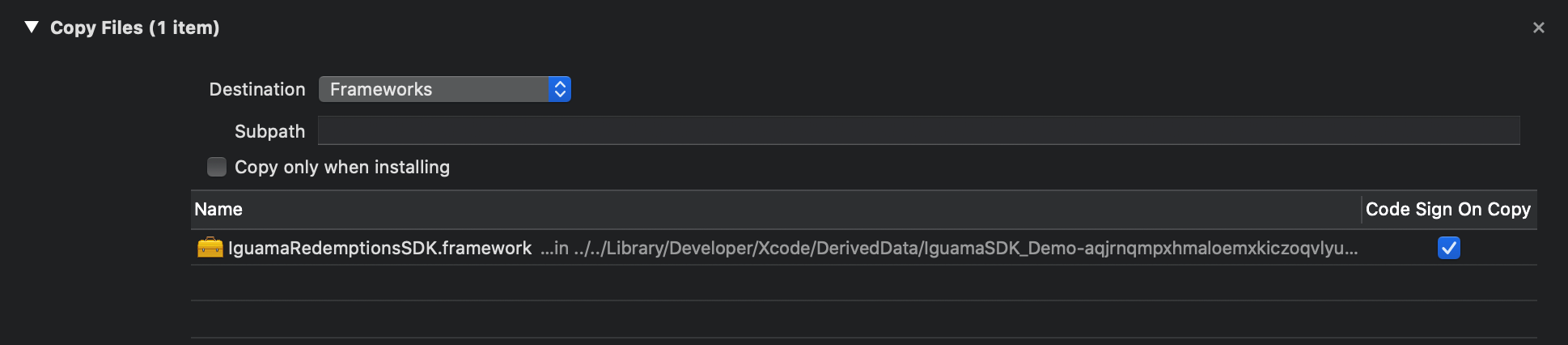
Step 2:
Add import to where IGWebSiteSDK is required
#import IguamaSDK;- Add IguamaSDK to your app using CocoaPods
Step 1:
Create a Podfile if you don't already have one:
cd your-project-directory

pod init
Step 2:
To your Podfile, add the iguamaSDK pods that you want to use in your app.
pod 'IguamaSDK'Step 3: Install the pods, then open your .xcworkspace file to see the project in Xcode:
pod install

open your-project.xcworkspace- Add IguamaSDK to your app using Carthage
Step 1: Go to the folder where the project is located through the terminal:
cd your-project-directory
Step 2: Create a Cartfile that lists the frameworks you’d like to use in your project. open -a Xcode Cartfile
Step 3:
Add framework address in cartfile:
github "iguama/IguamaSDK"(Address of the project on github, such as https://github.com/iguama/iguama-ios-sdk)
Step 4: Save and close the cart file and execute the command in the terminal:
carthage update --platform iOSStep 5:
At this time, the Carthage folder in the project has added IguamaSDK.framework.
open your project, click on project, select target, then select General above, and drag the required framework files to Linked frameworks and Binaries:
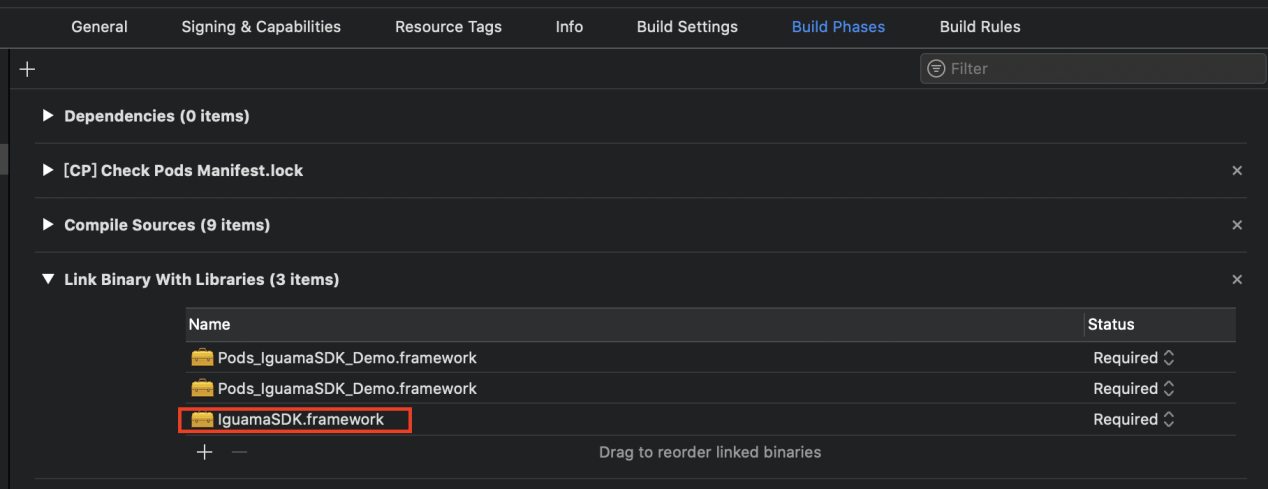
Step 6:
Click on the Build Phrase tab and add the corresponding run script, Add the framework path ( $ (SRCROOT) /Carthage/Build/iOS/IguamaSDK.framework ):
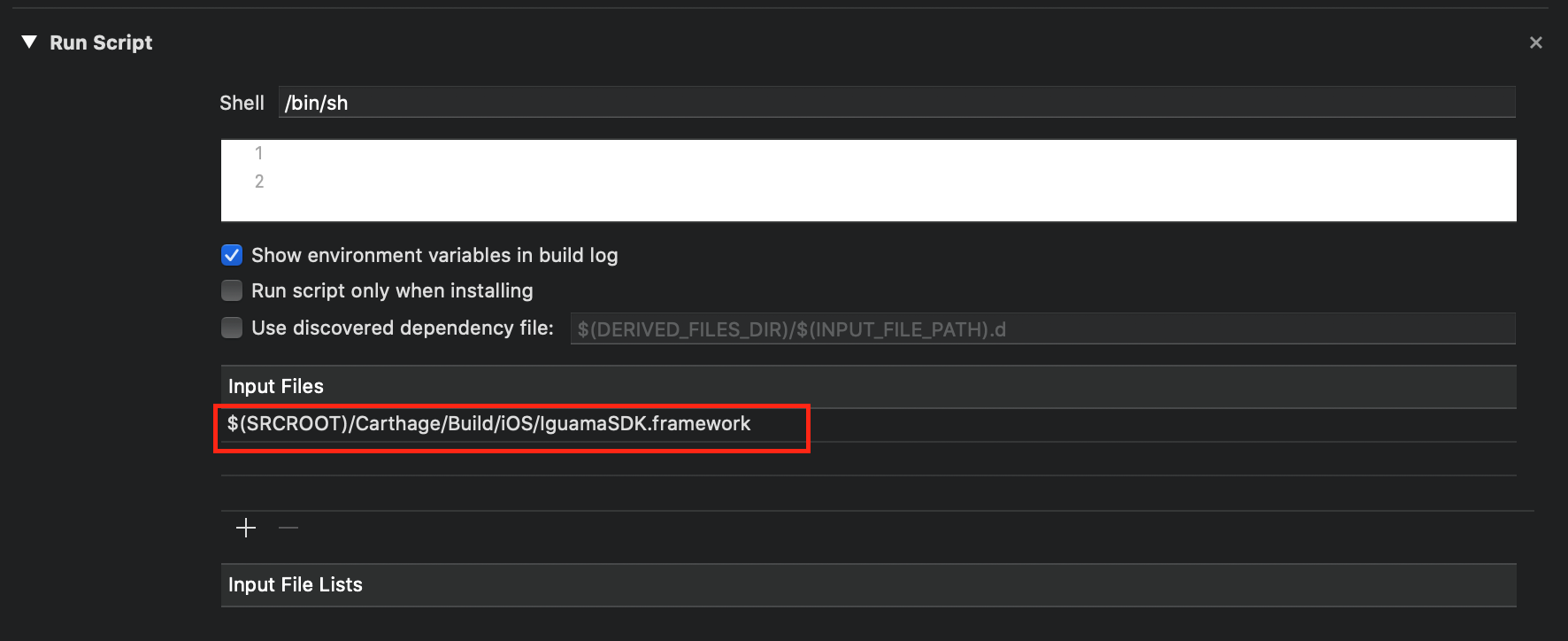
Step 7:
Click on the Build Phrase tab and add the corresponding copy files,
Add IguamaSDK.framework:
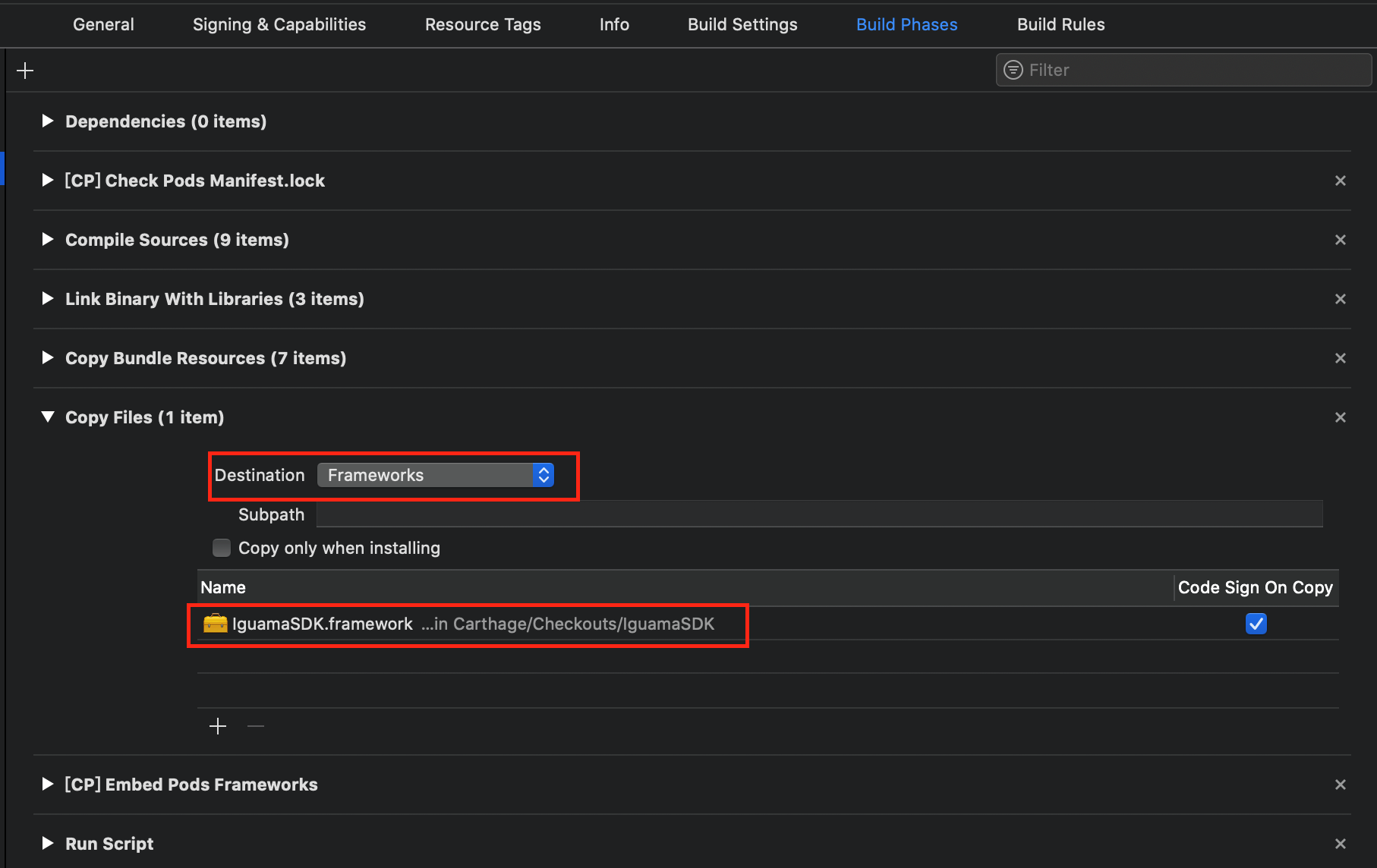
- Configuration
Open "AppDelegate.swif" file, and edit the following three parameters:
     func application(_ application: UIApplication, didFinishLaunchingWithOptions launchOptions: [UIApplication.LaunchOptionsKey: Any]?) -> Bool {
             // clientId、clientKey、sdkLogoImage、isSandbox
     IguamaSDK.config(clientId: "YOUR_CLIENT_ID", clientKey: "YOUR_CLIENT_KEY", sdkLogoImage: sdkLogoImge, isSandbox: false)
             return true
}| Parameters | Type/Required | Description |
|---|---|---|
| clientId | string/required | Loyal program’s identity Id for SDK. |
| clientKey | string/required | Loyal program’s secret key for SDK |
| sdkLogoImage | file/required | logo icon. |
| isSandbox | string/required | True is for sandbox test, false is for prod evn. |
- User Authorization
a. Authorize using Client Credentials
  let iguamaSDK = IguamaSDK()
  iguamaSDK.useClientCredentials()
iguamaSDK.login(member_id: memberId)| Parameters | Type/Required | Description |
|---|---|---|
| member_id | string/required | User's member id. |
b. Authorize using Grant Code (OAuth flow)
  let iguamaSDK = IguamaSDK()
  iguamaSDK.useGrantCode(grant_code: grantCode)
  iguamaSDK.login(member_id: memberId)

  iguamaSDK.refreshToken = { (oldToken:String, obtainToken:(_ newToken:String) -> Void) in
            // get fresh token by call obtainToken(), if failed to refresh token newToken is empty,
                  obtainToken(newToken)
}| Parameters | Type/Required | Description |
|---|---|---|
| grant_code | string/required | Grant Code that our platform will use to get the appropriate access token to perform actions on member's behalf. |
| member_id | string/required | User's member id. |
c. Authorize user using website integration
  let iguamaSDK = IguamaSDK()
iguamaSDK.login()- import code
Step 1:
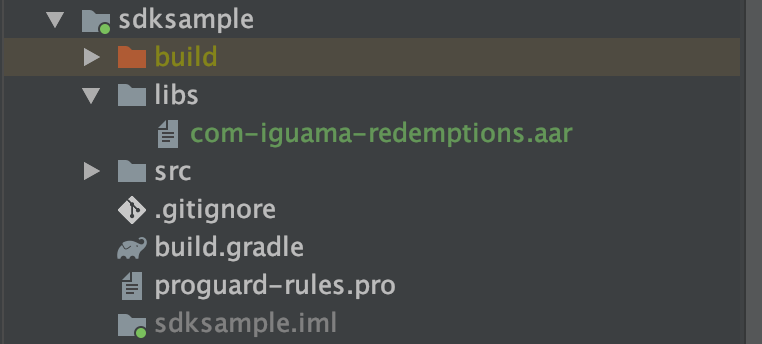
import com-iguama-redemptions.aar into libs folder in the merchant project, as shown in the figure below. Go to the project's Java Build Path and import com-iguama-redemptions.aar under libs. Select Order and Export, and check com-iguama-redemptions.aar.
Step 2:
In he build.gradle of your main project, add the following content to make the libs directory a dependent repository:
   allprojects {
                  repositories {
                      flatDir {
                          dirs 'libs'
                      }
                   }
              }
Step 3: In the build.gradle of your App Module, add the following to the com.iguama.sdk SDK as a project dependency:
      dependencies {
                      compile (name: 'com.iguama.sdk', ext: 'aar')
}- Configuration
Add the following declaration into file AndroidManifest.xml in the project:
      <meta-data
          android:name="com.iguama.client_id"
          android:value="${client_id}" />
      <meta-data
          android:name="com.iguama.secret_key"
          android:value="${secret_key}" />
      <meta-data
          android:name="com.iguama.is_qa"
          android:value="true" />
      <meta-data
          android:name="com.iguama.icon"
android:resource="@mipmap/ic_logo" />| Parameters | Type/Required | Description |
|---|---|---|
| com.iguama.client_id | string/required | Loyal program’s identity Id for SDK. |
| com.iguama.secret_key | string/required | Loyal program’s secret key for SDK |
| com.iguama.icon | file/required | logo icon. |
| com.iguama.is_qa | string/required | True is for sandbox test, false is for prod env. |
- User Authorization
a. Authorize using Client Credentials
   IguamaSDK iguamaSDK = new IguamaSDK.Builder(getApplication())
       .withClientCredentials()
       .memberId("yxz")
       .build();

iguamaSDK.launch();| Parameters | Type/Required | Description |
|---|---|---|
| member_id | string/required | User's member id. |
b. Authorize using Grant Code (Oauth flow)
   IguamaSDK iguamaSDK = new IguamaSDK.Builder(getApplication())
       .withGrantCode("xxxxx")
       .memberId("yxz")
       .build();

iguamaSDK.launch();| Parameters | Type/Required | Description |
|---|---|---|
| grant_code | string/required | Grant Code that our platform will use to get the appropriate access token to perform actions on member's behalf. |
| member_id | string/required | User's member id. |
c. Authorize user from website
    IguamaSDK iguamaSDK = new IguamaSDK.Builder(getApplication()).build();

    iguamaSDK.launch();