Git manager for multiple repositories with GitHub/GitLab/Bitbucket support.
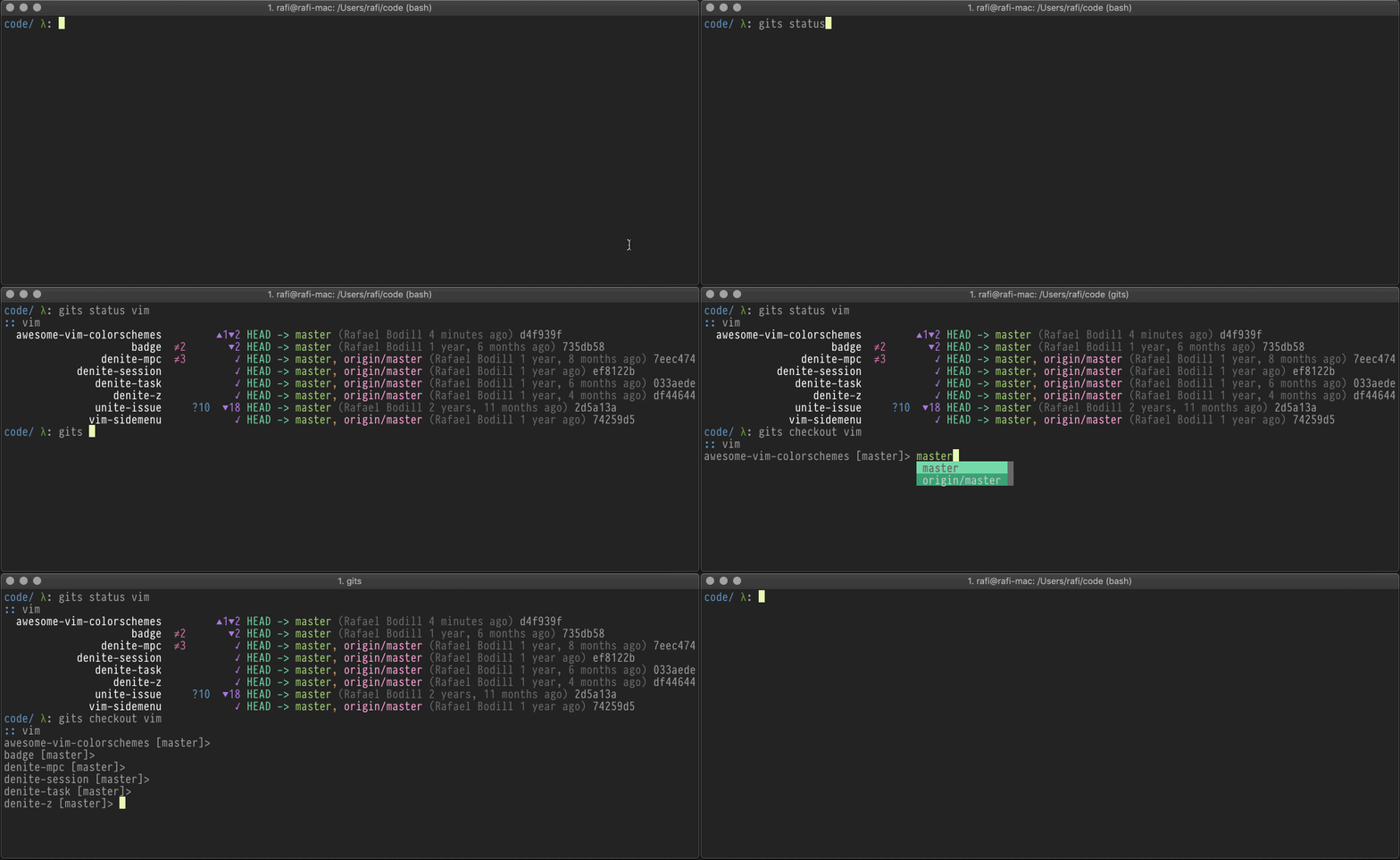
Use as a git clone manager, and while developing on multiple git repositories.
- GitHub/GitLab/Bitbucket/filesystem support with cache
- Interactive browsing of projects/repositories/branches/tags
- Clone/fetch/pull for multiple repositories
- Show one-line status with icons for all repositories
- List projects as table/tree/json/name
- Checkout branches interactively
- Configurable by YAML/JSON/TOML
On macOS with Homebrew:
brew install rafi/tap/gitsOr install gits with Go:
go install github.com/rafi/gitsUsage: gits [command] <project>
Available Commands:
add— Add repository to a projectbrowse— Browse branches and tagscd— Get repository pathcheckout— Traverse repositories and optionally checkout branchclone— Clone all repositories for specified project(s)fetch— Fetch and prune from all remoteshelp— Help about any commandlist— List all projects or their repositoriesorphan— Finds orphan repositorypull— Pull repositoriesstatus— Shows Git repositories short statussync— Synchronize project cachesversion— Shows current version
gits is configured by a YAML file. See examples. gits
will look for a config file at ~/.gits.yaml or
$XDG_CONFIG_HOME/gits/.git.yaml.
You can run gits with project names as arguments, or a local path to a
directory containing multiple projects.
Examples:
gits                # list all commands
gits list           # list all projects
gits list acme      # list all project 'acme' repositories

gits status acme    # show status for project 'acme' repositories
gits status ~/code  # show status for all repositories at path
gits status .       # show status for all repositories at current path
To use gits cd — source ./contrib/cdgit.sh in your shell
~/.bashrc or ~/.zshrc, and use cdgit to navigate to a repository.
Configuration file must be present at ~/.gits.yaml or $XDG_CONFIG_HOME/gits/.gits.yaml.
Warning
Each project in config file can either have a source or repos key, not both.
The structure of the config file is as follows:
---
# ~/.gits.yaml

# Project definition
projectname:          # Project name
  desc: My projects   # Optional
  path: ~/code/github # Optional if 'repos' are specified and have absolute paths.
  source:             # Required if no 'repos' defined, default: filesystem
    type: github      # Required: github|gitlab|bitbucket|filesystem
    search: rafi      # Required search query (organization, user name, group id)
  repos:              # Required if no 'source' defined
    - dir: foo        # Optional, default: repository name
      src: git@...    # Optional, default: repository remote URL
    - ...

anotherproject:
...Each project in the following example is defined differently:
---
# ~/.gits.yaml

# Github source.
mygithub:
  source:
    type: github
    search: rafi

# GitLab source, note that `path` and `desc` are optional.
work:
  path: ~/code/work
  desc: My work GitLab projects
  source:
    type: gitlab
    search: "12345678"  # Make sure GitLab group id is quoted

# Bitbucket source.
mybitbucket:
  source:
    type: bitbucket
    search: rafi

# Filesystem source that will be searched recursively.
explore:
  desc: Exploring projects
  path: ~/code/explore
  source:
    type: filesystem

# Relative directory name and implicit remote source URL.
acme:
  path: ~/code/acme
  desc: Acme is a really cool app.
  repos:
  - dir: admin
  - dir: ant-design-pro
  - dir: api
  - dir: infra
  - dir: ios
  - dir: react-native
  - dir: web
  - dir: webapp

# Relative directory name and explicit remote source URL.
myapp:
  path: ~/code/myapp
  repos:
  - dir: api                             # Can be absolute or relative to path
    src: https://github.com/app/api.git  # Optional remote clone URL
  - dir: ios
    src: https://github.com/app/ios.git
  - dir: android
    src: https://github.com/app/android.git

# Absolute directories and explicit remote source URL. (No project path)
rafi:
  desc: My dotfiles
  repos:
  - dir: ~/.config
    src: [email protected]:rafi/.config.git
  - dir: ~/.config/nvim
    src: [email protected]:rafi/vim-config.git