This is a GraphiQL plugin for Sphinx that lets you make GraphQL queries from your docs.
We built this for documenting Hasura GraphQL engine's API. Check it out in action here. (Note: In our docs we have added custom css overrides to make GraphiQL look as per our needs)
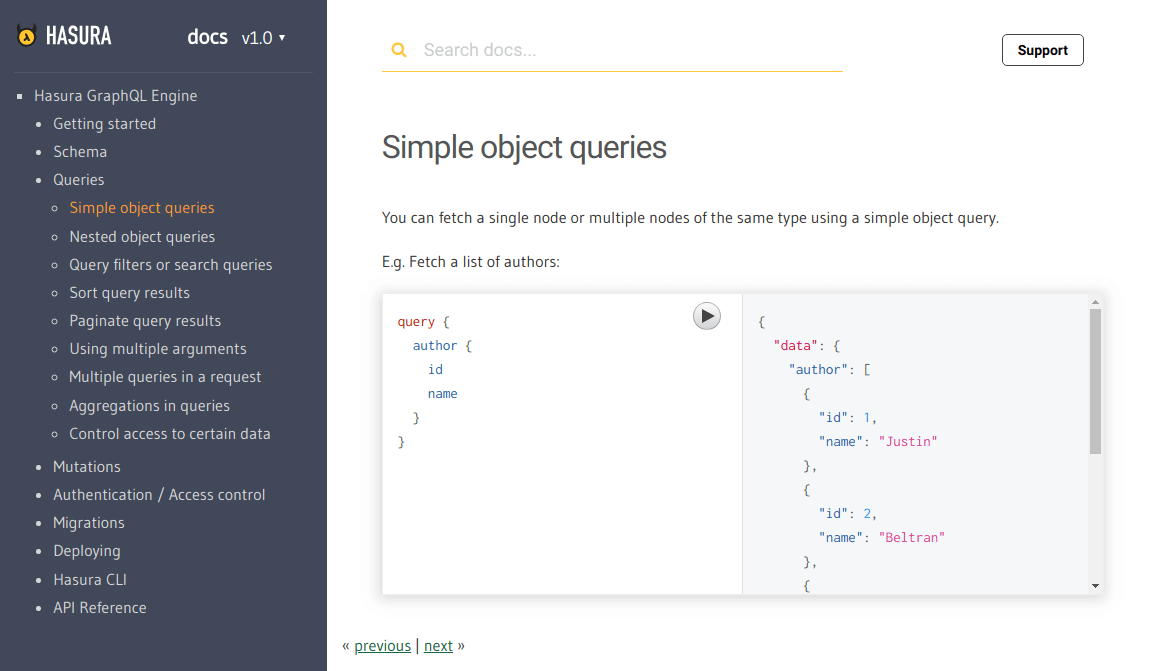
To insert a GraphiQL component inside your .rst doc, use the declarative:
.. graphiql::
   :query:
      query {
         author {
            id
            name
         }
}If you want to make GraphiQL view-only (ie: disable execution), you just have to add another option :view_only:. For example:
.. graphiql::
   :view_only:
   :query:
      query {
         author {
            id
            name
         }
}Sometimes you will want to show the response along with the query without executing it. You can do that by adding a :response: option.
.. graphiql::
   :view_only:
   :query:
      query {
         author {
            id
            name
         }
      }
   :response:
      {
         "data": {
            "author": [
               {
                  "id": 1
                  "name": "Justin",
               },
               {
                  "id": 2
                  "name": "Beltran",
               },
               {
                  "id": 3
                  "name": "Sidney",
               }
           ]
        }
}By default, the GraphQL endpoint is picked up from an environment variable as described here.
In case you want to explicitly set an endpoint for a query, you can do so by adding an :endpoint: option.
.. graphiql::
   :endpoint: http://localhost:8080/v1/graphql
   :query:
      query {
         author {
            id
            name
         }
}$ pip install sphinx_graphiqlYou might be using other extensions in your docs. Append sphinx_graphiql to the list of extensions.
extensions.append('sphinx_graphiql')
Add the following tags inside the <head></head> of your template html file (typically layout.html).
<!-- GraphiQL -->
<script src="//cdn.jsdelivr.net/react/15.4.2/react.min.js"></script>
<script src="//cdn.jsdelivr.net/react/15.4.2/react-dom.min.js"></script>
<script src="https://rawgit.com/hasura/sphinx_graphiql/master/static/graphiql/graphiql.min.js"></script>
<link href="https://rawgit.com/hasura/sphinx_graphiql/master/static/graphiql/graphiql.css" rel="stylesheet">
<link href="https://rawgit.com/hasura/sphinx_graphiql/master/static/styles.css" rel="stylesheet">
<script type="text/javascript">
  // graphql query fetcher
  const graphQLFetcher = function(endpoint) {
    endpoint = endpoint || "{{ GRAPHIQL_DEFAULT_ENDPOINT }}";
    return function(graphQLParams) {
      const params = {
        method: 'post',
        headers: {
          'Accept': 'application/json',
          'Content-Type': 'application/json'
        },
        body: JSON.stringify(graphQLParams),
        credentials: 'include'
      };
      return fetch(endpoint, params)
        .then(function (response) {
          return response.text();
        })
        .then(function (responseBody) {
          try {
            return JSON.parse(responseBody);
          } catch (error) {
            return responseBody;
          }
        });
    }
  };

  // create GraphiQL components and embed into HTML
  const setupGraphiQL = function() {
    if (typeof(React) === 'undefined' || typeof(ReactDOM) === 'undefined' || typeof(GraphiQL) === 'undefined') {
      return;
    }

    const targets = document.getElementsByClassName('graphiql');
    for (let i = 0; i < targets.length; i++) {
      const target = targets[i];
      const endpoint = target.getElementsByClassName("endpoint")[0].innerHTML.trim();
      const query = target.getElementsByClassName("query")[0].innerHTML.trim();
      const response = target.getElementsByClassName("response")[0].innerHTML.trim();
      const graphiQLElement = React.createElement(GraphiQL, {
        fetcher: graphQLFetcher(endpoint),
        schema: null, // TODO: Pass undefined to fetch schema via introspection
        query: query,
        response: response
      });
      ReactDOM.render(graphiQLElement, target);
    }
  };

  // if graphiql elements present, setup graphiql
  if (document.getElementsByClassName('graphiql').length > 0) {
    setupGraphiQL();
  }
</script>
You can find these tags at
static/static.htmlof the root directory.
You have to set the GraphQL endpoint as an environment variable in your sphinx configuration file (typically conf.py at the root your your project).
For example:
GRAPHIQL_DEFAULT_ENDPOINT = "https://graphql.my-graphql-app.io/v1/graphql"GraphiQL uses the GraphQL schema to auto complete as you type in queries and mutations.
If your GraphQL endpoint supports introspection, just pass undefined as the schema variable and
auto-completion will work out of the box.
const graphiQLElement = React.createElement(GraphiQL, {
  fetcher: graphQLFetcher(endpoint),
  schema: undefined, // the schema will be fetched using introspection
  query: query,
  response: response
});