

Working with arXiv data involves several recurring challenges: building syntactically correct search queries, navigating the category taxonomy with its legacy and modern schemes, and parsing article identifiers that come in multiple formats. The arxivql library brings these arXiv-specific structures into Python as first-class objects.
Queries — Build valid arXiv search strings from Python objects using a simple DSL, without memorizing field prefixes or logical operators.
Taxonomy — Navigate groups, archives and categories programmatically. Use the same taxonomy both for constructing category filters and for interpreting categories in search results or any other data source.
Article identifiers — Parse, normalize and inspect arXiv identifiers (legacy and modern formats) from search results or other sources.
arxivql focuses on data structures and leaves API requests to other libraries. Pair it with the excellent arxiv.py or any other client you prefer.
What it feels like:
# Build a query using arxivql DSL and pythonic category taxonomy
query = (Q.title("LLM") | Q.title("large language model")) & Q.category(T.cs.AI) &~ Q.abstract("transformer")

# Search using, e.g., arxiv.py library
result = next(arxiv.Client().results(arxiv.Search(query)))

# Parse article identifier and category
cat = categories_by_id[result.categories[0]]
aid = ArticleId.from_id(result.get_short_id())

print(aid.id, aid.base_id, aid.year, aid.month, aid.number, aid.version)
print(cat.id, cat.name, cat.description)pip install arxivqlThe Query class provides constructors for all supported arXiv fields and methods to combine them.
See the arXiv documentation for the official Search API details.
See the arXiv Search API behavior section for API behavior details and caveats.
from arxivql import Query as Q

# Single word search
print(Q.title('word'))
# Output:
# ti:word

# "All-word" phrase and author name searches
print(Q.abstract('some words'))
print(Q.author("Ilya Sutskever"))
# Output:
# abs:"some words"
# au:"Ilya Sutskever"
Multi-word field values are automatically double-quoted for "all-words" matching (see the arXiv Search API behavior section on quotes behavior below). For ANY word matching, pass a list to the constructor:
Q.abstract(["Syntactic", "natural language processing", "synthetic corpus"])
# Output:
# abs:(Syntactic "natural language processing" "synthetic corpus")
For ALL words matching, pass a tuple to the constructor:
Q.abstract(("Syntactic", "natural language processing", "synthetic corpus"))
# Output:
# abs:(Syntactic AND "natural language processing" AND "synthetic corpus")
Note: All searches are case-insensitive.
Filter by submission date range using datetime or date objects.
For convenience, None (the default) arguments make the date range open-ended.
Timezone-aware datetimes are converted to UTC.
Raw strings (e.g. "2023", "202301010600") are also accepted.
They are validated and used as-is.
from datetime import date, datetime
from arxivql import Query as Q

# Date range (times default to 00:00 GMT)
Q.submitted_date(date(2023, 1, 1), date(2024, 1, 1))
# Output: submittedDate:[202301010000 TO 202401010000]

# With specific times
Q.submitted_date(datetime(2023, 1, 1, 6, 0), datetime(2024, 1, 1, 6, 0))
# Output: submittedDate:[202301010600 TO 202401010600]

# Open-ended ranges (None for no bound)
Q.author("Terence Tao") & Q.submitted_date(date(2020, 1, 1), None)  # From 2020 onwards
# Output: (au:"Terence Tao" AND submittedDate:[202001010000 TO 900001010000])

Q.title("GPT") & ~Q.submitted_date(None, date(2023, 1, 1))  # Exclude before 2023
# Output: (ti:GPT ANDNOT submittedDate:[100001010000 TO 202301010000])

Q.submitted_date("2023", "202406011212")
# Output: submittedDate:[2023 TO 202406011212]Complex queries can be constructed by combining field filters using regular Python logical operators:
a1 = Q.author("Ilya Sutskever")
a2 = Q.author(("Geoffrey", "Hinton"))
c1 = Q.category("cs.NE")  # See taxonomy section for a more convenient way to specify categories
c2 = Q.category("cs.CL")

# AND operator
q1 = a1 & a2 & c1
# Output:
# ((au:"Ilya Sutskever" AND au:(Geoffrey AND Hinton)) AND cat:cs.NE)

# OR operator
q2 = (a1 | a2) & (c1 | c2)
# Output:
# ((au:"Ilya Sutskever" OR au:(Geoffrey AND Hinton)) AND (cat:cs.NE OR cat:cs.CL))

# ANDNOT operator
q3 = a1 & ~a2
# Output:
# (au:"Ilya Sutskever" ANDNOT au:(Geoffrey AND Hinton))
Plain strings can also be combined with Query objects.
In that case, strings are treated as raw query fragments, wrapped in parentheses before being combined:
q = Q.category("cs.AI") & "machine learning"
print(q)
# (cat:cs.AI AND (machine learning))

print("machine learning" & Q.category("cs.AI"))
# ((machine learning) AND cat:cs.AI)
The following operations raise exceptions due to arXiv API limitations:
~a1       # Error: There is no standalone negation operator in the arXiv API, only combined ANDNOT
a1 | ~a2  # Error: There is no ORNOT operator in the arXiv API
Wildcards (? and *) can be used in queries as usual, but there are some important caveats.
See the arXiv Search API behavior section for more details.
Constructed queries can be directly used in the Python arXiv API wrapper:
# pip install arxiv

import arxiv
from arxivql import Query as Q, Taxonomy as T

query = Q.author("Ilya Sutskever") & Q.title("autoencoders") & ~Q.category(T.cs.AI)
search = arxiv.Search(query=query)
client = arxiv.Client()
results = list(client.results(search))

print(f"query = {query}")
for result in results:
    print(result.get_short_id(), result.title)

# Output:
# query = ((au:"Ilya Sutskever" AND ti:autoencoders) ANDNOT cat:cs.AI)
# 1611.02731v2 Variational Lossy AutoencoderThe Taxonomy class provides a structured interface for managing arXiv categories.
Basic usage:
from arxivql import Taxonomy as T

print(T.cs.AI)
print(Q.category(T.cs.AI))
print(Q.category(T.cs))
print(Q.category((T.cs.LG, T.stat.ML)) & Q.title("LLM"))
# Output:
# cs.AI
# cat:cs.AI
# cat:cs.*
# (cat:(cs.LG AND stat.ML) AND ti:LLM)
Note the wildcard syntax in archive-level queries (e.g., T.cs).
Archives and archive-like categories are also iterable:
# Iterate over all Computer Science categories
for cat in T.cs:
    print(cat.id)

# Single-category archives act as one-element iterables
for cat in T.hep_th:
    print(cat.id)  # hep-th

# Regular categories are not iterable
try:
    for cat in T.cs.AI:
        pass
except TypeError:
    print("T.cs.AI is not iterable")
The Taxonomy class provides comprehensive category information:
category = T.astro_ph.HE
print("id:          ", category.id)
print("name:        ", category.name)
print("group_name:  ", category.group_name)
print("archive_id:  ", category.archive_id)
print("archive_name:", category.archive_name)
print("description: ", category.description)
# Output:
# id:           astro-ph.HE
# name:         High Energy Astrophysical Phenomena
# group_name:   Physics
# archive_id:   astro-ph
# archive_name: Astrophysics
# description:  Cosmic ray production, acceleration, propagation, detection. Gamma ray astronomy and bursts, X-rays, charged particles, supernovae and other explosive phenomena, stellar remnants and accretion systems, jets, microquasars, neutron stars, pulsars, black holes
Category is an immutable, hashable dataclass, so you can safely use category objects as keys in dictionaries or members of sets.
from arxivql import Taxonomy as T

seen = {T.cs.AI, T.cs.AI, T.stat.ML}
cats_map = {T.cs.AI: "my info"}
print(sorted(c.id for c in seen))
print(cats_map[T.cs.AI])
# Output:
# ['cs.AI', 'stat.ML']
# my info
The library also provides a useful category catalog.
Combined with archive iteration (e.g., for cat in T.cs), this allows one to work with all archives as collections.
from arxivql.taxonomy import catalog, categories_by_id

print(len(categories_by_id.keys()))
# Output:
# 176

print(len(catalog.all_categories))
# Output:
# 176

print(len(catalog.all_archives))
print(Q.category(catalog.all_archives))
# Output:
# 38
# cat:(cs.* econ.* eess.* math.* q-bio* q-fin.* stat.* astro-ph* cond-mat* nlin.* physics.* gr-qc hep-ex hep-lat hep-ph hep-th math-ph nucl-ex nucl-th quant-ph acc-phys adap-org alg-geom ao-sci atom-ph bayes-an chao-dyn chem-ph cmp-lg comp-gas dg-ga funct-an mtrl-th patt-sol plasm-ph q-alg solv-int supr-con)

archive_sizes = [len(list(archive)) for archive in catalog.all_archives]
print(archive_sizes)
# Output:
# [40, 3, 4, 32, 11, 9, 6, 7, 10, 5, 22, 1, 1, 1, 1, 1, 1, 1, 1, 1, 1, 1, 1, 1, 1, 1, 1, 1, 1, 1, 1, 1, 1, 1, 1, 1, 1, 1]

archive_sizes = [len(archive) for archive in catalog.all_archives]
print(archive_sizes)
# Output:
# [40, 3, 4, 32, 11, 9, 6, 7, 10, 5, 22, 1, 1, 1, 1, 1, 1, 1, 1, 1, 1, 1, 1, 1, 1, 1, 1, 1, 1, 1, 1, 1, 1, 1, 1, 1, 1, 1]

# Broad Machine Learning categories, see official classification guide
# https://blog.arxiv.org/2019/12/05/arxiv-machine-learning-classification-guide
print(len(catalog.ml_broad))
print(Q.category(catalog.ml_broad))
# Output:
# 16
# cat:(cs.LG stat.ML math.OC cs.CV cs.CL eess.AS cs.IR cs.HC cs.SI cs.CY cs.GR cs.SY cs.AI cs.MM cs.ET cs.NE)

# Core Machine Learning categories according to Andrej Karpathy's `arxiv sanity preserver` project:
# https://github.com/karpathy/arxiv-sanity-preserver
print(len(catalog.ml_karpathy))
print(Q.category(catalog.ml_karpathy))
# Output:
# 6
# cat:(cs.CV cs.AI cs.CL cs.LG cs.NE stat.ML)

# Legacy categories
print(len(catalog.legacy))
# Output:
# 21
Because the arxivql taxonomy is complete (see Legacy Categories below),
you can reliably map all category IDs from search results to Category objects:
from arxivql.taxonomy import categories_by_id

# Example: category IDs from an article's metadata
article_categories = ["cs.LG", "q-bio.BM", "cond-mat"]

# Map to Category objects
for cat_id in article_categories:
    cat = categories_by_id[cat_id]
    print(f"{cat.id}, {cat.name}, {cat.archive_name}")
# Output:
# cs.LG, Machine Learning, Computer Science
# q-bio.BM, Biomolecules, Quantitative Biology
# cond-mat, (Legacy) Condensed Matter, Condensed MatterThe taxonomy includes 21 legacy arXiv categories that were reorganized into modern archives or subject classes (see catalog.legacy in the example above).
Three of these legacy categories (astro-ph, cond-mat, q-bio) share their ID with modern archives.
For convenience, they are included in their corresponding archives as legacy (e.g., T.astro_ph.legacy, T.cond_mat.legacy, T.q_bio.legacy).
Summary of reorganizations (search "reorg" in arXiv news archive and see cond-mat reorganization for details):
| Legacy | Superseded by |
|---|---|
astro-ph, cond-mat, q-bio |
Became archives with subject classes |
alg-geom, dg-ga, funct-an, q-alg |
Folded into math archive (Dec 1997) |
supr-con, mtrl-th |
Moved into cond-mat |
adap-org, chao-dyn, comp-gas, patt-sol, solv-int |
Consolidated into nlin archive |
acc-phys, ao-sci, atom-ph, plasm-ph, chem-ph |
Became physics.* subject classes |
cmp-lg |
Became cs.CL |
bayes-an |
Short-lived; see physics.data-an / stat |
Most likely, there were other categories historically, but they were all reclassified into the modern taxonomy or the legacy categories above. The modern 155 categories and 21 legacy ones cover all categories present in the current arXiv database. The completeness of arxivql taxonomy was verified against the full arXiv metadata dump:
import json
from arxivql.taxonomy import categories_by_id

num_articles = 0
num_categories = 0
with open("arxiv-metadata-oai-snapshot.json", "r") as fp:
    for line in fp:
        info = json.loads(line)
        article_categories = info["categories"].split()
        num_articles += 1
        num_categories += len(article_categories)
        for category in article_categories:
            assert category in categories_by_id
print("total articles:  ", num_articles)
print("total categories:", num_categories)
# Output:
# total articles:   2890332
# total categories: 4978826
According to the official arXiv Category Taxonomy documentation, the following modern categories are defined as aliases:
cs.NAis an alias formath.NAcs.SYis an alias foreess.SYmath.ITis an alias forcs.ITmath.MPis an alias formath-phq-fin.ECis an alias forecon.GNstat.THis an alias formath.ST
Interestingly enough, only three of these (math.IT, math.MP, stat.TH) never show up as primary categories in article metadata.
arXiv uses two identifier schemes: the modern YYMM.NNNN[N] format (since April 2007) and the legacy archive[.subject]/YYMMNNN format.
The helper ArticleId class parses both into a structured dataclass.
from arxivql import ArticleId

aid = ArticleId.from_id("arXiv:quant-ph/0201082v1")

aid.base_id   # "quant-ph/0201082"
aid.version   # 1 (None if no explicit version)
aid.year      # 2002
aid.month     # 1
aid.number    # 82
aid.prefix    # "arXiv"
aid.archive   # "quant-ph" (None for modern identifiers)

aid.id        # "arXiv:quant-ph/0201082v1" (reconstructed canonical id)
The parser is tested on all article identifiers in full arXiv metadata dump.
See arXiv identifiers official documentation for more details on formats.
-
Category searches consider all listed categories, not only primary ones.
-
arXiv supports two wildcard characters:
?and*.?replaces one character in a word*replaces zero or more characters in a word- They don't match the first character of the term, i.e.,
au:??tskeverfails, butau:Sutske???is okay - Categories can also be "wildcarded", i.e.,
cat:cs.?Iis a valid filter ?and*can be combined, e.g.,cat:q-?i*is valid and matches bothq-bioandq-fin- Text fields other than
authorandcategoryare stemmed (see the notes on normalization and API quirks below), which means that wildcards often do not work as expected on them.
-
arXiv search engine internally normalizes input terms before matching (based on observed behavior -- this is not documented in the official API):
-
Terms are lowercased, hyphens are replaced with spaces, text is tokenized into words, and each token is stemmed with a Porter-like stemmer before being reassembled into a query string.
-
Example normalizations:
transformers→transformself-attention mechanisms→self attent mechan
-
This normalization also applies to quoted searches. For example,
ti:"mechanics"can match both "mechanic" and "mechanism", becausemechanicsis normalized tomechan. More on quoted-query behavior below. -
The
authorfield is not stemmed, soau:johnandau:johnsare different queries. -
Because of this normalization, the following queries are equivalent:
abs:"self-attention mechanisms" abs:"self AND attention AND mechanisms" abs:(self AND attention AND mechanisms) abs:("self-attention mechanisms") abs:("Mechanisms Attention Self") abs:"selfs attentive mechanics" abs:"-- selfs -- --- attentive----mechanics --" abs:("-- -- mechaniC --- ATTENTIVE----seLfs --") -
You can approximate this normalization locally using NLTK:
import nltk

nltk.download("punkt_tab")
stemmer = nltk.PorterStemmer()


def normalize_text(text: str) -> str:
    text_clean = text.lower()
    text_clean = text_clean.replace("-", " ")
    tokens = nltk.word_tokenize(text_clean)
    stemmed = [stemmer.stem(token) for token in tokens]
    return " ".join(stemmed)


print(normalize_text("transformers"))
print(normalize_text("self-attention mechanisms"))
# Output:
# transform
# self attent mechan
-
-
Quoted items imply exact matching, but:
- For regular text fields (i.e., all except categories), this behaves like an AND operator over all normalized words in the quoted phrase in any order (see normalization note above), rather than strict character-by-character phrase matching.
- For categories, quoted multi-category queries don't work at all. For example,
cat:"hep-th cs.AI"andcat:"cs.* hep-th"don't match anything and give zero results. TheQ.categoryconstructor in this library raises an exception for this case. - Single categories can be quoted (
cat:"cs.*"), but this is redundant. - Beyond the usages above, double quotes are special characters and should be carefully handled. They often give unintuitive results: for example,
ti:"returns an error, whileti:"",ti:"""", andti:"""""return identical matches without a"character in them, and""2"""is equivalent to""2""but not to"2". - This library raises exceptions for most such problematic queries.
-
Spaces between terms or fields imply OR operations:
cat:hep-th cat:cs.AIequalscat:hep-th OR cat:cs.AI -
Parentheses serve two purposes:
-
Grouping logical operations
-
Defining field scope, e.g.,
ti:(some words)treats spaces as OR operations. Examples:cat:(cs.AI hep-th)matches articles with either categorycat:(cs.* hep-th)functions as expected with wildcards
Note that several categories inside
catparentheses are okay.
-
-
Explicit operators in field scopes are supported:
ti:(some OR words)andti:(some AND words)are valid. -
The
id_listparameter (and legacyid:field filter) in the arXiv Search API is used internally to filter over the "major" article IDs (2410.21276), not the "version" IDs (2410.21276v1).- When used with a non-empty query:
# pip install arxiv

arxiv.Search(query="au:Sutskever", id_list=["2303.08774v6"])  # zero results
arxiv.Search(query="au:Sutskever", id_list=["2303.08774"])    # -> 2303.08774v6 (latest)
- BUT if the query is left empty,
id_listandid:can be used to search for the exact article version:arxiv.Search(id_list=["2303.08774"]) # -> 2303.08774v6 (latest) arxiv.Search(id_list=["2303.08774v4"]) # -> 2303.08774v4 arxiv.Search(id_list=["2303.08774v5"]) # -> 2303.08774v5 arxiv.Search(id_list=["2303.08774v99"]) # -> obscure error
- When used with a non-empty query:
-
Empty query matches all articles, i.e., no filtering is applied.
-
There are some other unintuitive API quirks:
- Query
all:-(or just-) matches actual "-" character across different article fields. Butti:-andabs:-match nothing. - Query
all:atte?tionworks as expected, butabs:atte?tionreturns only 5 matches andti:atte?tionreturns zero matches. - Queries
ti:atten?andti:atten*return identical results, as if "attention" was searched for. Butti:attent?returns nothing. This is probably because the stem of "attention" is "attent", which matchesatten?but notattent?. - And likely more.
- Query
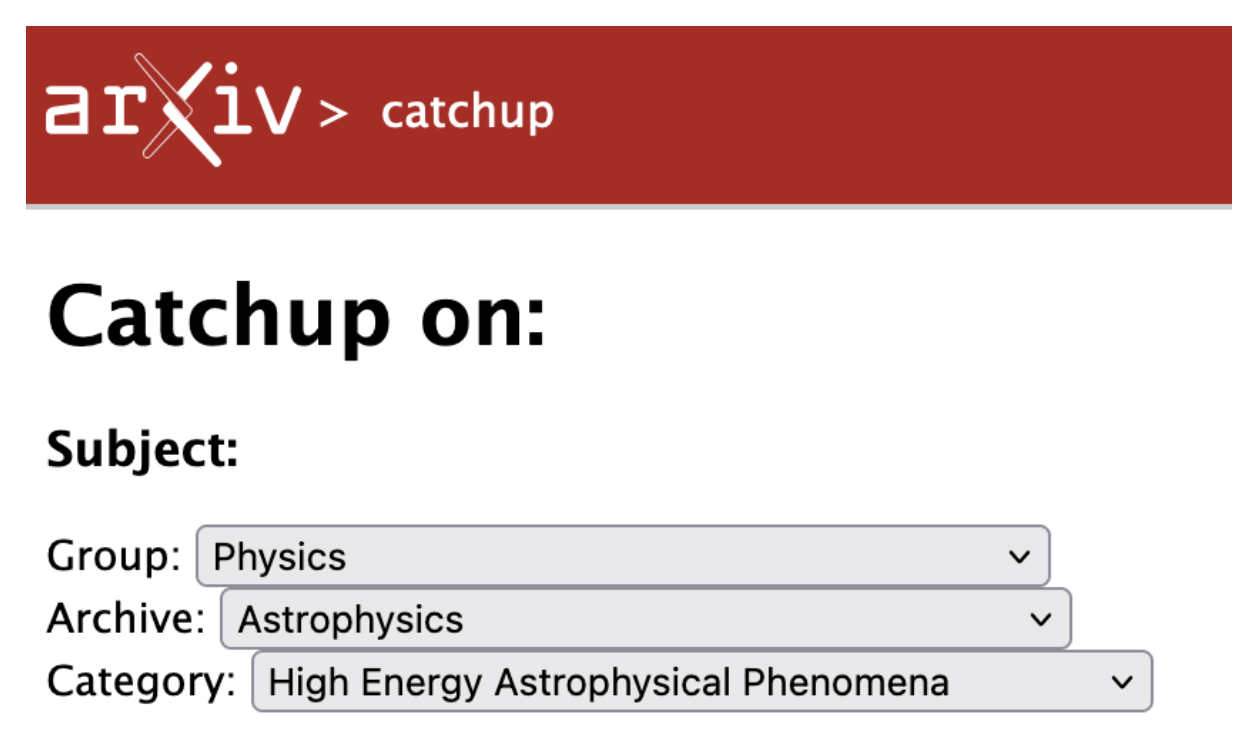
The arXiv taxonomy consists of three hierarchical levels: group → archive → category. For complete details, consult the arXiv Category Taxonomy and arXiv Catchup Interface.
Categories represent the finest granularity of classification.
Category identifiers typically follow the pattern {archive}.{category}, with some exceptions noted below.
Example: In astro-ph.HE, the hierarchy is:
- Group:
Physics - Archive:
Astrophysics - Category:
High Energy Astrophysical Phenomena - Queryable ID:
astro-ph.HE
Groups constitute the top level of the taxonomy, currently including:
- Computer Science
- Economics
- Electrical Engineering and Systems Science
- Mathematics
- Physics
- Quantitative Biology
- Quantitative Finance
- Statistics
Archives form the intermediate level, with each belonging to exactly one group.
Special cases:
-
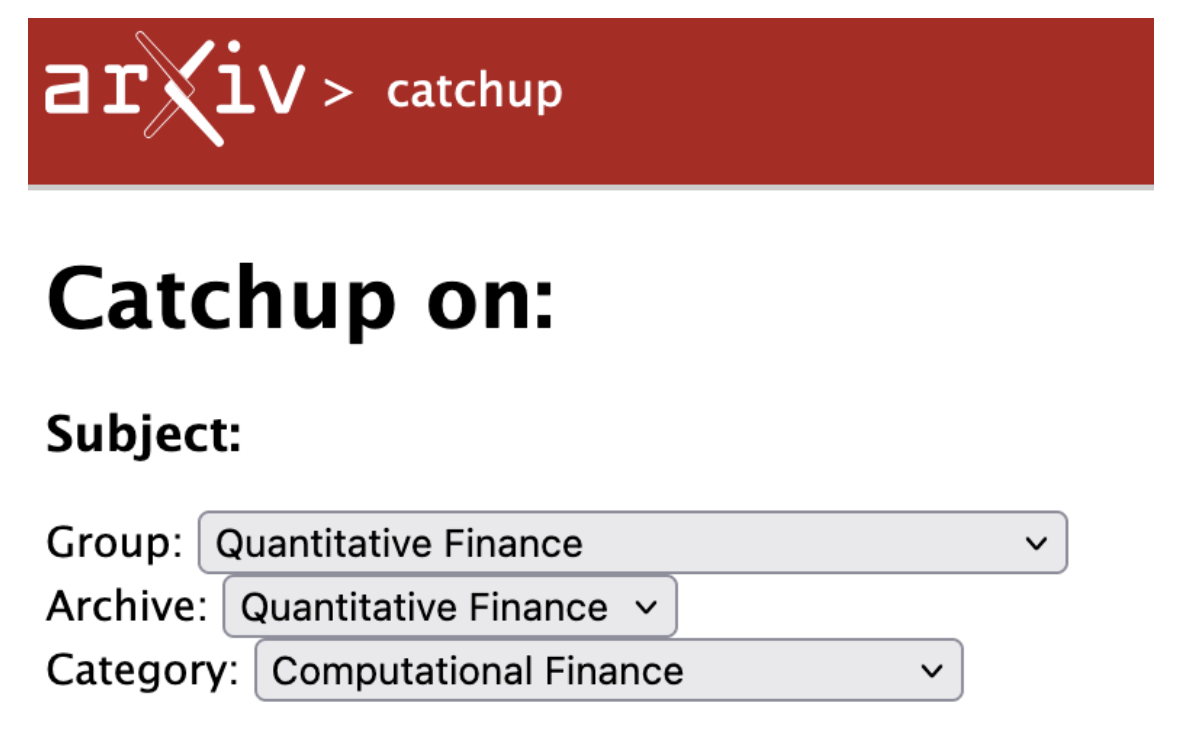
Single-archive groups:
- When a group contains only one archive, they share the same name
- Example: the hierarchy of the
q-fin.CPcategory isQuantitative Finance→Quantitative Finance→Computational Finance
-
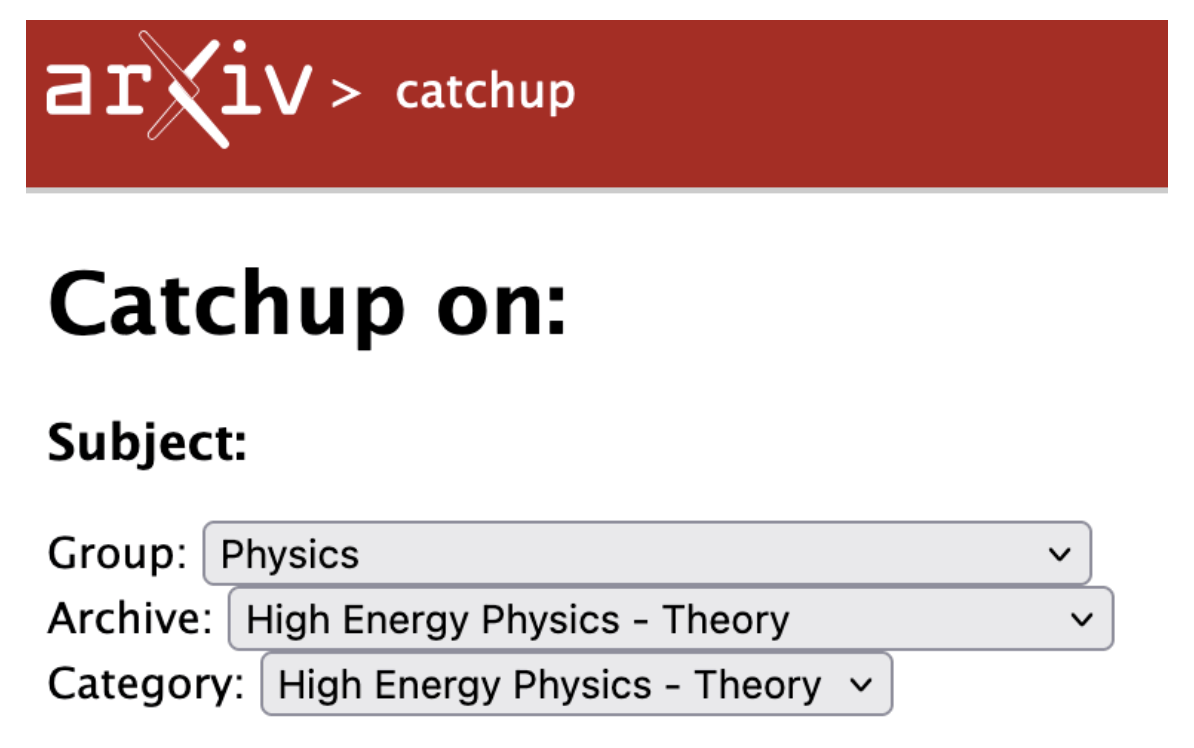
Single-category archives:
- When an archive contains only one category, the archive name is omitted from the identifier
- Example: the hierarchy of the
hep-thcategory isPhysics→High Energy Physics - Theory→High Energy Physics - Theory
Note: The Physics group contains a Physics archive alongside other archives, which may cause confusion.
The library includes a comprehensive test suite.
Unit tests verify query construction without making arXiv API calls:
pip install pytest
pytest tests/Live tests make actual requests to the arXiv API to verify query behavior:
pip install arxiv
python tests/live_arxiv_queries.py
or
pytest tests/live_arxiv_queries.pyNote: Live tests are not run by pytest (the file is intentionally not prefixed with test_).