
- Activate the automatic tests on commit under the Actions tab.
- Make sure that the test suite located under src/test/java runs successfully after your implementation!
- A green tick should appear next to your commit in the GitHub repository since test cases are executed upon code changes. You can check those runs under the Actions tab.
- The class Main should run and terminate without errors. Make sure you have imported the maven project defined in the
pom.xml. - Create a new package
relationshipexampleunderno.hvl.dat250.jpa.tutorial. - Create the following three classes Family, Job, and Person in the new package:
package no.hvl.dat250.jpa.tutorial.relationshipexample;

import jakarta.persistence.Entity;
import jakarta.persistence.GeneratedValue;
import jakarta.persistence.GenerationType;
import jakarta.persistence.Id;
import jakarta.persistence.OneToMany;
import java.util.ArrayList;
import java.util.List;


@Entity
public class Family {
  @Id
  @GeneratedValue(strategy = GenerationType.IDENTITY)
  private Long id;
  private String description;

  @OneToMany(mappedBy = "family")
  private final List<Person> members = new ArrayList<>();

  // getters and setters

}
package no.hvl.dat250.jpa.tutorial.relationshipexample;
import jakarta.persistence.Entity;
import jakarta.persistence.GeneratedValue;
import jakarta.persistence.GenerationType;
import jakarta.persistence.Id;
@Entity
public class Job {
@Id
@GeneratedValue(strategy = GenerationType.IDENTITY)
private Long id;
private double salary;
private String jobDescr;
// getters and setters
}package no.hvl.dat250.jpa.tutorial.relationshipexample;
import jakarta.persistence.Entity;
import jakarta.persistence.GeneratedValue;
import jakarta.persistence.GenerationType;
import jakarta.persistence.Id;
import jakarta.persistence.ManyToOne;
import jakarta.persistence.OneToMany;
import jakarta.persistence.Transient;
import java.util.ArrayList;
import java.util.List;
@Entity
public class Person {
@Id
@GeneratedValue(strategy = GenerationType.IDENTITY)
private Long id;
private String firstName;
private String lastName;
@ManyToOne
private Family family;
@Transient
private String nonsenseField = "";
@OneToMany
private List<Job> jobList = new ArrayList<>();
// getters and setters
}The file persistence.xml in src/main/resources/META-INF is configured to automatically map them to database tables using Hibernate. Have a look at the persistence.xml and try to roughly understand its content.
- Can you find out which database is used and where the database stores its files?
- Now add the following JUnit test JpaTest under
src/test/javain a new packageno.hvl.dat250.jpa.tutorial.relationshipexample:
package no.hvl.dat250.jpa.tutorial.relationshipexample;

import static org.junit.jupiter.api.Assertions.assertEquals;
import static org.junit.jupiter.api.Assertions.assertThrows;

import jakarta.persistence.EntityManager;
import jakarta.persistence.EntityManagerFactory;
import jakarta.persistence.Persistence;
import jakarta.persistence.Query;

import org.junit.jupiter.api.BeforeEach;
import org.junit.jupiter.api.Test;

public class JpaTest {

    private static final String PERSISTENCE_UNIT_NAME = "jpa-tutorial";
    private EntityManagerFactory factory;

    @BeforeEach
    public void setUp() {
        factory = Persistence.createEntityManagerFactory(PERSISTENCE_UNIT_NAME);
        EntityManager em = factory.createEntityManager();

        // Begin a new local transaction so that we can persist a new entity
        em.getTransaction().begin();

        // read the existing entries
        Query q = em.createQuery("select m from Person m");
        // Persons should be empty

        // do we have entries?
        boolean createNewEntries = (q.getResultList().size() == 0);

        // No, so lets create new entries
        if (createNewEntries) {
            assertEquals(0, q.getResultList().size());
            Family family = new Family();
            family.setDescription("Family for the Knopfs");
            em.persist(family);
            for (int i = 0; i < 40; i++) {
                Person person = new Person();
                person.setFirstName("Jim_" + i);
                person.setLastName("Knopf_" + i);
                person.setFamily(family);
                // now persists the family person relationship
                family.getMembers().add(person);
                em.persist(person);
                em.persist(family);
            }
        }

        // Commit the transaction, which will cause the entity to
        // be stored in the database
        em.getTransaction().commit();

        // It is always good practice to close the EntityManager so that
        // resources are conserved.
        em.close();

    }

    @Test
    public void checkAvailablePeople() {

        // now lets check the database and see if the created entries are there
        // create a fresh, new EntityManager
        EntityManager em = factory.createEntityManager();

        // Perform a simple query for all the Message entities
        Query q = em.createQuery("select m from Person m");

        // We should have 40 Persons in the database
        assertEquals(40, q.getResultList().size());

        em.close();
    }

    @Test
    public void checkFamily() {
        EntityManager em = factory.createEntityManager();
        // Go through each of the entities and print out each of their
        // messages, as well as the date on which it was created
        Query q = em.createQuery("select f from Family f");

        // We should have one family with 40 persons
        assertEquals(1, q.getResultList().size());
        assertEquals(40, ((Family) q.getSingleResult()).getMembers().size());
        em.close();
    }

    @Test
    public void deletePerson() {
        assertThrows(jakarta.persistence.NoResultException.class, () -> {

            EntityManager em = factory.createEntityManager();
            // Begin a new local transaction so that we can persist a new entity
            em.getTransaction().begin();
            Query q = em
                    .createQuery("SELECT p FROM Person p WHERE p.firstName = :firstName AND p.lastName = :lastName");
            q.setParameter("firstName", "Jim_1");
            q.setParameter("lastName", "Knopf_!");
            Person user = (Person) q.getSingleResult();
            em.remove(user);
            em.getTransaction().commit();
            Person person = (Person) q.getSingleResult();

            em.close();
        });
    }
}- Run all tests. They should all succeed.
The setUp() method will create a few test entries. After the test entries are created, they will be read/deleted during the tests.
- Where do the getters/setters used in the
setUp()method come from?
- The final project should look like this:

Implement the domain model for credit cards similar to the Person-Address-Examples in the lecture on object-relational mappings. Pay close attention to the bidirectional associations in the domain model.

Questions:
- Explain the used database and how/when it runs.
- Can you provide the SQL used to create the table Customer?
- Find a way to inspect the database tables being created and create a database schema in your report. Do the created tables correspond to your initial thoughts regarding the exercise?
Persist the objects shown in the following object diagram into your database in the class CreditCardsMain of the project. If you need more knowledge about persistence management (entityManager-operations persist(), find(), etc...), look into the lecture notes of Lecture 9.
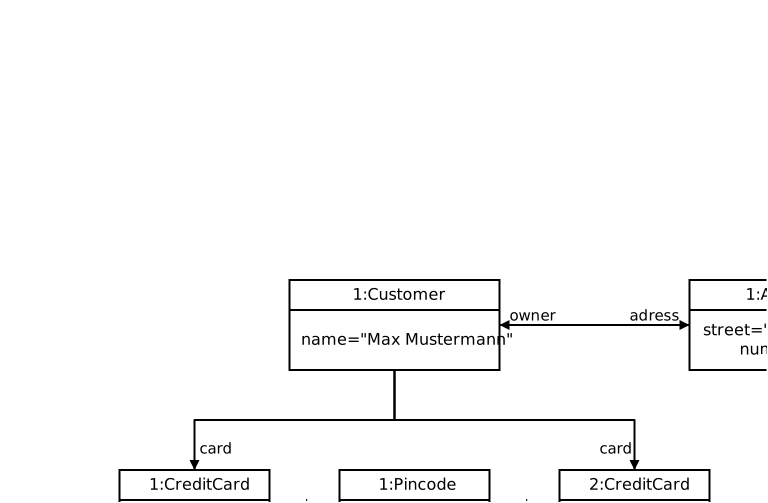
Make sure the associated test case CreditCardsMainTest runs successfully. You are not allowed to change the test case! If you forked the repository correctly, tests are automatically run when you push your changes.
This tutorial is partly based on https://www.vogella.com/tutorials/JavaPersistenceAPI/article.html#example.